rayrai Visualizer
Overview
rayrai is an in-process C++ renderer for RaiSim. It renders into an offscreen OpenGL texture and is designed to embed in custom UIs (ImGui, Qt, etc.) or headless pipelines. Unlike RaisimUnity or RaisimUnreal, rayrai runs inside the simulation process and exposes direct access to render targets, picking, and custom visuals.
Key characteristics:
In-process rendering (no server required)
Offscreen textures for UI embedding or sensor simulation
Lightweight scene management for RaiSim objects and custom visuals
Support for point clouds, coordinate frames, and picking
Direct ImGui/SDL2 integration patterns and headless/offscreen workflows
The public API lives in the raisin namespace (note the spelling). The primary entry
point is raisin::RayraiWindow.
Dependencies
rayrai depends on SDL2, OpenGL, glbinding, glm, assimp, stb, and imgui. The installed
package in rayrai/<OS> ships the headers and CMake config for these dependencies.
Included binary (recommended)
For most users, the easiest way to use rayrai is the included TCP viewer binary.
It lives at rayrai/<OS>/bin/rayrai_raisim_tcp_viewer (Linux packages ship it;
other platforms may need to build it) and works with RaisimServer-based
simulations. Run the binary while your simulation is running, and it will connect
to the server to display the scene.
You can start it directly from the repo:
./rayrai/<OS>/bin/rayrai_raisim_tcp_viewer
Run it with --help to see available options. On Windows, use the .exe
binary.
If you are running a RaisimServer-based example, start the example first so the
server is listening (by default on port 8080), then launch the viewer to connect.
Build and link
rayrai installs a CMake package under rayrai/<OS>. Add it to
CMAKE_PREFIX_PATH and link the rayrai target.
find_package(rayrai CONFIG REQUIRED)
add_executable(my_app main.cpp)
target_link_libraries(my_app PRIVATE rayrai)
In practice, you will also set the Raisim prefix (for example, -DCMAKE_PREFIX_PATH)
to include both raisim/<OS> and rayrai/<OS>.
Minimal usage
The typical workflow is:
Create a RaiSim world.
Construct a
raisin::RayraiWindowfor that world.Update the renderer each frame and consume the output texture.
#include <memory>
#include <raisim/World.hpp>
#include <rayrai/RayraiWindow.hpp>
int main() {
auto world = std::make_shared<raisim::World>();
raisin::RayraiWindow viewer(world, 1280, 720);
auto sphere = viewer.addVisualSphere("goal", 0.2, 0.9f, 0.2f, 0.2f, 1.0f);
sphere->setPosition(0.0, 0.0, 1.0);
while (true) {
world->integrate();
viewer.update(1280, 720, false, 0, 0, false);
unsigned int tex = viewer.getImageTexture();
(void)tex; // use the texture in your UI or pipeline
}
}
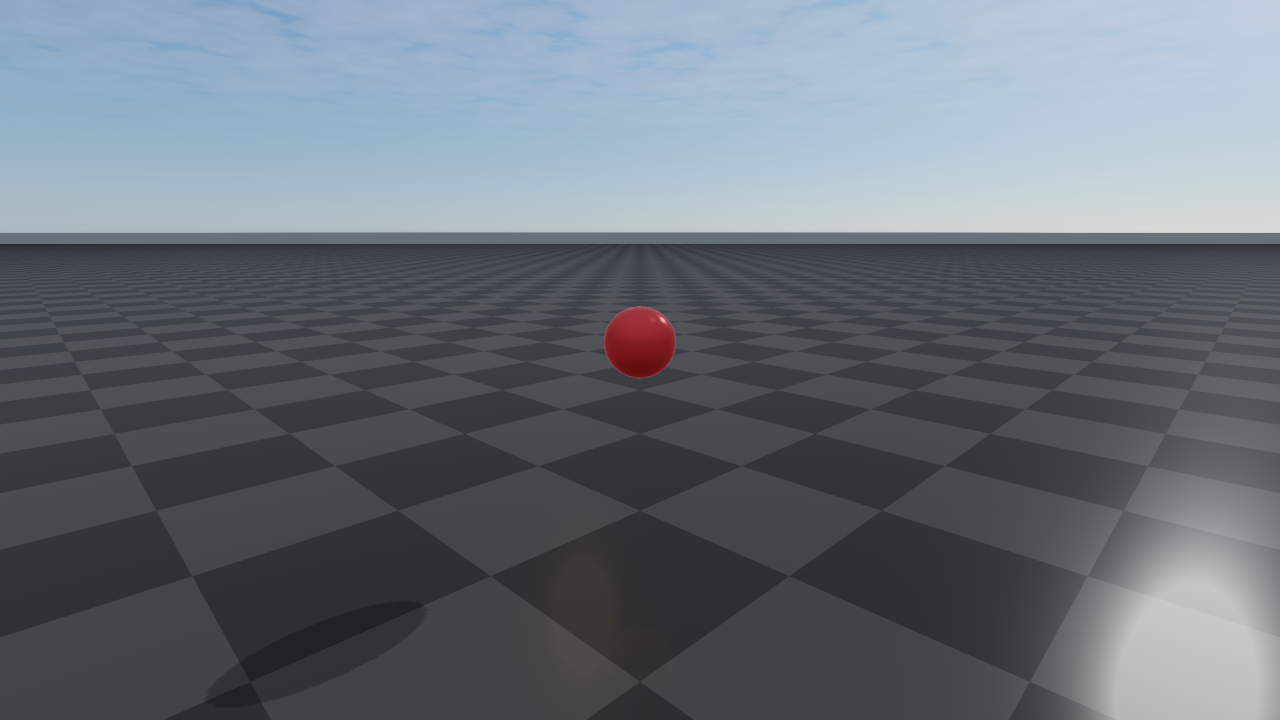
If you are integrating with an existing OpenGL context, you can use
RayraiWindow::createOffscreenGlContext and
RayraiWindow::makeOffscreenContextCurrent to control the context setup.
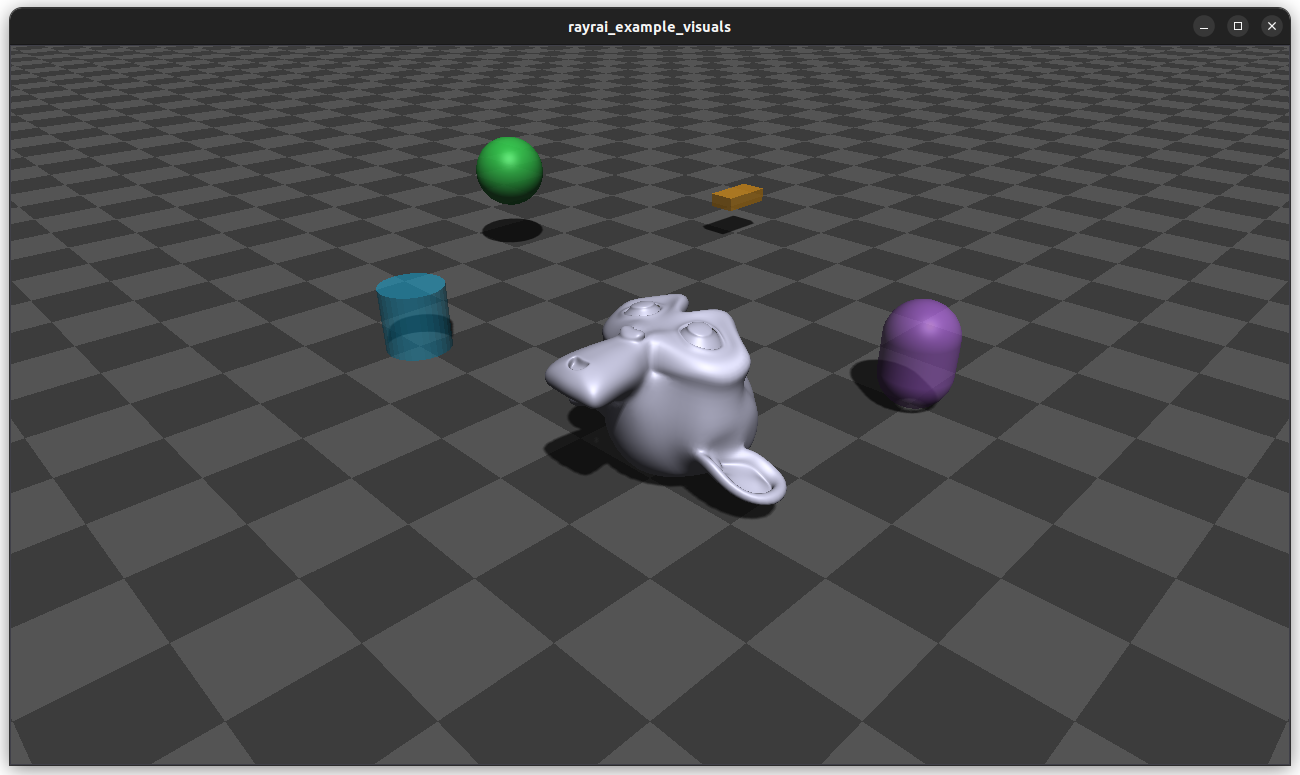
Example: custom visuals + background color
This example adds a custom box, renders an RGB texture each frame, and reads the
image texture handle for UI integration. setBackgroundColor expects RGBA in
0..255 space (matching the example sources).
#include <memory>
#include <raisim/World.hpp>
#include <rayrai/RayraiWindow.hpp>
int main() {
auto world = std::make_shared<raisim::World>();
world->addGround();
raisin::RayraiWindow viewer(world, 1280, 720);
viewer.setBackgroundColor({40, 45, 55, 255});
auto box = viewer.addVisualBox("marker", 0.4, 0.2, 0.1, 0.9f, 0.6f, 0.1f, 1.0f);
box->setPosition(1.0, 0.0, 0.3);
while (true) {
world->integrate();
viewer.update(1280, 720, false, 0, 0, false);
unsigned int colorTex = viewer.getImageTexture();
(void)colorTex; // feed into your UI or pipeline
}
}
Shadows
rayrai uses a directional light for shadows. By default, the shadow center tracks a
point in front of the camera and the shadow box is fixed in size. You can customize
both via RayraiWindow:
// shadow center is N meters ahead of the camera (default: 10.0)
viewer.setShadowCenterOffset(12.0f);
// shadow box (default: halfSize=12.5, near=0.1, far=55.0)
viewer.setShadowOrtho(20.0f, 0.1f, 80.0f);
If you need a fully custom shadow view/projection, use the lower-level
raisin::Light API directly.
Examples
Rayrai examples are documented in Examples. Each example page includes a short explanation and the full source code, along with build and run notes.
Quick map to the shipped examples (examples/src/rayrai):
rayrai_custom_visuals.cpp: custom visuals (sphere/box/cylinder/capsule/mesh).rayrai_instancing_grid.cpp: instanced visuals and per-instance updates.rayrai_pointcloud_animation.cpp: point cloud updates and GPU uploads.rayrai_rgb_camera.cpp: RGBCamera rendering and ImGui preview.rayrai_depth_camera.cpp: DepthCamera rendering + linear depth preview.rayrai_lidar_pointcloud.cpp: LiDAR scan to point cloud visualization.rayrai_complete_showcase.cpp: end-to-end demo with sensors, UI, and overlays.rayrai_tcp_viewer.cpp: TCP viewer for RaisimServer scenes.
ImGui integration (SDL2 + OpenGL)
rayrai is designed to be embedded in custom UI. The repository ships a minimal
SDL2/ImGui helper in rayrai/example_common.hpp. The core idea is:
Create an OpenGL context (SDL2 here).
Render the RayraiWindow texture into an ImGui
Image.Forward hover and cursor data to
RayraiWindow::update.
Minimal pattern (trimmed from the examples):
ExampleApp app;
if (!app.init("rayrai_example", 1280, 720))
return -1;
auto world = std::make_shared<raisim::World>();
auto viewer = std::make_shared<raisin::RayraiWindow>(world, 1280, 720);
while (!app.quit) {
app.processEvents();
world->integrate();
app.beginFrame();
app.renderViewer(*viewer); // ImGui::Image + viewer.update(...)
app.endFrame();
}
The renderViewer helper uses ImGui::IsItemHovered() and mouse positions
to drive camera interaction and picking. See rayrai_rgb_camera.cpp and
rayrai_depth_camera.cpp for overlay windows showing camera outputs.
Headless/offscreen OpenGL context
If you already manage an OpenGL context (or want a headless one), use the static helpers to create and bind a hidden SDL window context:
SDL_Window* window = nullptr;
SDL_GLContext glContext = nullptr;
raisin::RayraiWindow::createOffscreenGlContext(window, glContext, "rayrai_offscreen");
raisin::RayraiWindow::makeOffscreenContextCurrent(window, glContext);
auto world = std::make_shared<raisim::World>();
raisin::RayraiWindow viewer(world, 640, 480);
Custom visuals and instancing
rayrai renders two categories of content:
RaiSim objects: The renderer mirrors the objects already in the world.
Custom visuals: Extra visuals you add explicitly (spheres, boxes, meshes, etc.).
Custom visuals are created through RayraiWindow and returned as Visuals:
auto box = viewer.addVisualBox("marker", 0.1, 0.1, 0.1, 0.2f, 0.6f, 1.0f, 1.0f);
box->setPosition(1.0, 0.0, 0.5);
For repeated geometry, use InstancedVisuals to reduce draw overhead:
auto instanced = viewer.addInstancedVisuals(
"boxes", raisim::Shape::Box, glm::vec3(0.1f, 0.1f, 0.1f),
glm::vec4(1.f, 0.2f, 0.2f, 1.f), glm::vec4(0.2f, 0.2f, 1.f, 1.f));
instanced->addInstance(glm::vec3(0.0f, 0.0f, 0.1f), 0.0f);
instanced->addInstance(glm::vec3(0.2f, 0.0f, 0.1f), 1.0f);
If you want to load meshes once and share them across visuals, use
raisin::RayraiGlobalAsset and addVisualCustomMesh:
auto assets = std::make_shared<raisin::RayraiGlobalAsset>();
auto meshes = assets->getMeshes("/path/to/model.obj");
auto custom = viewer.addVisualCustomMesh("custom", meshes, glm::vec4(0.9f, 0.9f, 1.0f, 1.0f));
custom->setPosition(0.0, 1.0, 0.5);
Point clouds and coordinate frames
Point clouds and coordinate frames are lightweight debug aids:
auto cloud = viewer.addPointCloud("scan");
auto frame = viewer.addCoordinateFrame("robot_frame");
These objects are rendered alongside the world and can be updated every frame.
Call updatePointBuffer() after changing point cloud data.
cloud->positions = {glm::vec3(0, 0, 1), glm::vec3(0.2f, 0.1f, 1.1f)};
cloud->colors = {glm::vec4(0, 1, 0, 1), glm::vec4(1, 0, 0, 1)};
cloud->updatePointBuffer();
Camera control and picking
RayraiWindow manages an internal camera for offscreen rendering.
You can access or override it through getCamera() or by using
renderWithExternalCamera when you want explicit control.
Picking is available through pickWithExternalCamera. It renders a
selection pass and returns the encoded object id for a pixel.
The internal update call drives camera input and picking:
// Cursor is in framebuffer coordinates of the render area
viewer.update(width, height, isHovered, cursorX, cursorY, shouldClick);
Sensor alignment
rayrai can align rendering to RaiSim camera sensors. Use
syncRaisimCameraPose and renderWithExternalCamera to ensure the
render camera matches the sensor pose and intrinsics.
Note: syncRaisimCameraPose updates Camera::position/front/up directly;
avoid calling Camera::update() immediately afterward unless you also update
yaw/pitch.
RGB/Depth camera workflow (manual source + external camera):
auto rgbCam = anymal->getSensorSet("d455_front")->getSensor<raisim::RGBCamera>("color");
auto depthCam = anymal->getSensorSet("d455_front")->getSensor<raisim::DepthCamera>("depth");
rgbCam->setMeasurementSource(raisim::Sensor::MeasurementSource::MANUAL);
depthCam->setMeasurementSource(raisim::Sensor::MeasurementSource::MANUAL);
raisin::Camera rgbCamera(*rgbCam);
raisin::Camera depthCamera(*depthCam);
viewer.renderWithExternalCamera(*rgbCam, rgbCamera, {});
viewer.renderWithExternalCamera(*depthCam, depthCamera, {});
viewer.renderDepthPlaneDistance(*depthCam, depthCamera);
You can read back the camera buffers on CPU:
const auto& prop = rgbCam->getProperties();
const int width = std::max(1, prop.width);
const int height = std::max(1, prop.height);
std::vector<char> rgba(size_t(width) * size_t(height) * 4);
rgbCamera.getRawImage(*rgbCam, raisin::Camera::SensorStorageMode::CUSTOM_BUFFER,
rgba.data(), rgba.size(), /*flipVertical=*/false);
Depth uses a float buffer with width * height entries.
Depth and LiDAR
The renderer supports a linear depth plane and a GPU-assisted LiDAR pass:
renderDepthPlaneDistancerenders a linear depth texture.measureSpinningLidarSingleDrawGPUrenders a LiDAR slice using a spherical chunk shader.
You can retrieve the depth texture via getDepthPlaneTexture().
LiDAR usage has two paths:
CPU-based scan via RaiSim (
SpinningLidar::update), then visualize with a point cloud.GPU slice rendering via
measureSpinningLidarSingleDrawGPUfor fast incremental updates.
GPU slice example:
lidar->updatePose();
const glm::dvec3 posW = raisin::toGlm(lidar->getPosition());
const glm::dmat3 rotW = raisin::toGlm(lidar->getOrientation());
viewer.measureSpinningLidarSingleDrawGPU(*lidar, posW, rotW);
Additional tips
If you add/remove RaiSim objects after constructing the viewer, call
RayraiWindow::updateObjectLists()so the renderer refreshes its cache.Use
setShowCollisionBodies(true)for debug visualization of collision shapes.If you want rayrai overlays to use your ImGui font, pass it via
setExternalFont.
API
Core types
-
class RayraiWindow
Offscreen renderer and visual scene manager for raisim.
RayraiWindow maintains an internal Camera, shader set, and a set of visual objects that can be rendered into an offscreen texture. It can render raisim world objects, custom visuals, point clouds, and coordinate frames.
Public Functions
Construct an offscreen renderer tied to a raisim world.
- Parameters:
world – Shared world pointer used for pulling object state.
width – Initial render target width.
height – Initial render target height.
-
RayraiWindow(raisim::World &world, int width = 300, int height = 300)
Construct an offscreen renderer tied to a raisim world.
- Parameters:
world – World reference used for pulling object state.
width – Initial render target width.
height – Initial render target height.
-
void resize(int newWidth, int newHeight)
Resize the internal camera render target.
- Parameters:
newWidth – New framebuffer width in pixels.
newHeight – New framebuffer height in pixels.
-
void update(int w, int h, bool isHovering, int cX, int cY, bool shouldClick)
Render one frame into the internal camera’s offscreen texture.
- Parameters:
w – Target width.
h – Target height.
isHovering – Whether the mouse is over the render area (for input).
cX – Cursor x position inside the render area.
cY – Cursor y position inside the render area.
shouldClick – Whether mouse click selection should be processed.
-
unsigned int getImageTexture() const
Return the GL texture id of the internal camera output.
- Returns:
Texture id for the most recent rendered frame.
-
void setCameraFixedDistance(bool fixed)
Keep the camera distance constant when orbiting a target.
- Parameters:
fixed – True to lock distance.
-
void setCameraFixedTarget(bool fixed)
Keep the camera target fixed in world space.
- Parameters:
fixed – True to lock the target position.
-
void setBackgroundColor(const glm::vec4 &color)
Set background clear color (0..1 range).
- Parameters:
color – RGBA color.
-
void setFogDensity(float density)
Set scene fog density used by the mesh shader.
- Parameters:
density – Exponential fog density.
-
float getFogDensity() const
Get current fog density.
- Returns:
Fog density value.
-
Camera &getCamera()
Access the internal camera for direct manipulation.
- Returns:
Reference to the internal camera.
-
inline const Visuals *getTargetVisual() const
Get the currently selected target visual, if any.
- Returns:
Pointer to the target visual or nullptr.
-
void setTargetVisual(Visuals *visual)
Set the target visual for camera tracking.
- Parameters:
visual – Visual to target, or nullptr to clear.
-
void setShadowOrtho(float halfSize, float zNear, float zFar)
Set the directional shadow box (orthographic) parameters.
- Parameters:
halfSize – Half-size of the ortho box.
zNear – Near plane.
zFar – Far plane.
-
void setShadowCenterOffset(float meters)
Set the shadow center offset distance along the camera forward vector.
- Parameters:
meters – Distance ahead of the camera.
-
inline float getShadowCenterOffset() const
Get the current shadow center offset distance.
- Returns:
Distance ahead of the camera.
-
void renderWithExternalCamera(raisim::RGBCamera &sensorCam, Camera &externalCam, const RenderOverrides &ov)
Render using a raisim RGB camera and an external render camera.
- Parameters:
sensorCam – Raisim RGB camera providing projection parameters and pose.
externalCam – Render camera to use for rendering.
ov – Optional shader/toggle overrides.
-
void renderWithExternalCamera(raisim::DepthCamera &sensorCam, Camera &externalCam, const RenderOverrides &ov)
Render using a raisim depth camera and an external render camera.
- Parameters:
sensorCam – Raisim depth camera providing projection parameters and pose.
externalCam – Render camera to use for rendering.
ov – Optional shader/toggle overrides.
-
void renderWithExternalCamera(Camera &externalCam, const RenderOverrides &ov)
Render using an external render camera.
- Parameters:
externalCam – Render camera to use for rendering.
ov – Optional shader/toggle overrides.
-
uint32_t pickWithExternalCamera(Camera &externalCam, int x, int y, Shader *pickingOverride = nullptr)
Run the picking pass and return object id at a pixel.
- Parameters:
externalCam – Render camera used for the picking pass.
x – Pixel x coordinate in framebuffer space.
y – Pixel y coordinate in framebuffer space.
pickingOverride – Optional picking shader override.
- Returns:
Encoded object id, or 0 if nothing is picked.
-
std::shared_ptr<PointCloud> addPointCloud(const std::string &name)
Create a named point cloud.
- Parameters:
name – Unique name for the point cloud.
- Returns:
Shared pointer to the point cloud instance.
-
void removePointCloud(const std::string &name)
Remove a point cloud by name.
- Parameters:
name – Name of the point cloud to remove.
-
std::shared_ptr<CoordinateFrame> addCoordinateFrame(const std::string &name)
Create a named coordinate frame set.
- Parameters:
name – Unique name for the coordinate frame set.
- Returns:
Shared pointer to the coordinate frame instance.
-
void removeCoordinateFrame(const std::string &name)
Remove a coordinate frame set by name.
- Parameters:
name – Name of the coordinate frame set to remove.
-
std::shared_ptr<Visuals> addVisualSphere(const std::string &name, double radius, float colorR = 1.f, float colorG = 1.f, float colorB = 1.f, float colorA = 1.f)
Add a visual sphere (not part of raisim::World).
- Parameters:
name – Visual name.
radius – Sphere radius.
colorR – Red channel.
colorG – Green channel.
colorB – Blue channel.
colorA – Alpha channel.
- Returns:
Shared pointer to the created visual.
-
std::shared_ptr<Visuals> addVisualBox(const std::string &name, double xLength, double yLength, double zLength, float colorR = 1.f, float colorG = 1.f, float colorB = 1.f, float colorA = 1.f)
Add a visual box (not part of raisim::World).
- Parameters:
name – Visual name.
xLength – Box size in X.
yLength – Box size in Y.
zLength – Box size in Z.
colorR – Red channel.
colorG – Green channel.
colorB – Blue channel.
colorA – Alpha channel.
- Returns:
Shared pointer to the created visual.
-
std::shared_ptr<Visuals> addVisualCylinder(const std::string &name, double radius, double height, float colorR = 1.f, float colorG = 1.f, float colorB = 1.f, float colorA = 1.f)
Add a visual cylinder (not part of raisim::World).
- Parameters:
name – Visual name.
radius – Cylinder radius.
height – Cylinder height.
colorR – Red channel.
colorG – Green channel.
colorB – Blue channel.
colorA – Alpha channel.
- Returns:
Shared pointer to the created visual.
-
std::shared_ptr<Visuals> addVisualCapsule(const std::string &name, double radius, double height, float colorR = 1.f, float colorG = 1.f, float colorB = 1.f, float colorA = 1.f)
Add a visual capsule (not part of raisim::World).
- Parameters:
name – Visual name.
radius – Capsule radius.
height – Capsule height.
colorR – Red channel.
colorG – Green channel.
colorB – Blue channel.
colorA – Alpha channel.
- Returns:
Shared pointer to the created visual.
-
std::shared_ptr<Visuals> addVisualMesh(const std::string &name, const std::string &meshFile, double scaleX = 1.0, double scaleY = 1.0, double scaleZ = 1.0, float colorR = 1.f, float colorG = 1.f, float colorB = 1.f, float colorA = 1.f)
Add a visual mesh (not part of raisim::World).
- Parameters:
name – Visual name.
meshFile – Mesh file path.
scaleX – Mesh scale in X.
scaleY – Mesh scale in Y.
scaleZ – Mesh scale in Z.
colorR – Red channel.
colorG – Green channel.
colorB – Blue channel.
colorA – Alpha channel.
- Returns:
Shared pointer to the created visual.
Add a visual from custom OpenGL meshes.
- Parameters:
name – Visual name.
meshes – Mesh list to render.
color – Default color for non-textured meshes.
- Returns:
Shared pointer to the created visual.
-
std::shared_ptr<Visuals> getVisualObject(const std::string &name)
Look up a visual by name.
- Parameters:
name – Visual name.
- Returns:
Shared pointer to the visual, or nullptr if not found.
-
void removeVisualObject(const std::string &name)
Remove a visual object by name.
- Parameters:
name – Visual name to remove.
-
std::shared_ptr<InstancedVisuals> addInstancedVisuals(const std::string &name, raisim::Shape::Type type, const glm::vec3 &size, const glm::vec4 &color1, const glm::vec4 &color2, const std::string &meshFile = "")
Create instanced visuals for repeated shapes or meshes.
- Parameters:
name – Visual name.
type – Shape type.
size – Base size for the instances.
color1 – Primary instance color.
color2 – Secondary instance color.
meshFile – Mesh file for mesh instances.
- Returns:
Shared pointer to the created instanced visuals.
-
std::shared_ptr<InstancedVisuals> getInstancedVisuals(const std::string &name)
Look up instanced visuals by name.
- Parameters:
name – Visual name.
- Returns:
Shared pointer to the instanced visuals, or nullptr if not found.
-
void removeInstancedVisuals(const std::string &name)
Remove instanced visuals by name.
- Parameters:
name – Visual name to remove.
-
std::shared_ptr<CameraFrustum> addCameraFrustum(const std::string &name, const glm::vec4 &color = glm::vec4(1.f, 1.f, 1.f, 1.f))
Create a camera frustum visualization.
- Parameters:
name – Visual name.
color – Frustum color.
- Returns:
Shared pointer to the frustum helper.
-
inline void setGroundPatternResourcePath(const std::string &path)
Set a tiled ground texture for halfspace visuals.
- Parameters:
path – Path to the texture image.
-
inline std::string getGroundPatternResourcePath()
Get the current ground texture path.
- Returns:
Ground texture path string.
-
void updateObjectLists()
Refresh internal lists of raisim objects.
-
void orthogonalViewSwitch()
Toggle between perspective and orthographic view.
-
void renderDepthPlaneDistance(raisim::DepthCamera &sensorCam, Camera &cam, Shader *depthPlaneOverride = nullptr)
Render a linear depth plane for a raisim depth camera.
- Parameters:
sensorCam – Raisim depth camera.
cam – Render camera to use.
depthPlaneOverride – Optional shader override.
-
void renderDepthPlaneDistance(Camera &cam, Shader *depthPlaneOverride = nullptr)
Render a linear depth plane with a given camera.
- Parameters:
cam – Render camera to use.
depthPlaneOverride – Optional shader override.
-
inline unsigned int getDepthPlaneTexture() const
Get the linear depth texture id.
- Returns:
OpenGL texture id for R32F linear depth.
-
void measureSpinningLidarSingleDrawGPU(raisim::SpinningLidar &lidar, const glm::dvec3 &sensorPosW, const glm::dmat3 &sensorRotW, const raisim::Object *objectToExclude = nullptr)
Render a single-draw incremental GPU LiDAR slice.
Renders the largest contiguous yaw span for this timestep using a spherical chunk shader.
- Parameters:
lidar – Raisim spinning lidar to update.
sensorPosW – LiDAR position in world coordinates.
sensorRotW – LiDAR orientation in world coordinates.
objectToExclude – Optional object to exclude from rendering (e.g., the carrier).
-
inline void setDOFEnabled(bool e)
Enable or disable depth of field post-processing.
- Parameters:
e – True to enable.
-
inline void setDOFParams(float focusDist, float focusRange, float maxRadius)
Set depth of field parameters.
- Parameters:
focusDist – Focus distance in view space.
focusRange – Focus range around the focus distance.
maxRadius – Max blur radius in pixels.
-
inline void setShowCollisionBodies(bool show)
Toggle rendering of collision shapes for articulated systems.
- Parameters:
show – True to render collision bodies.
-
inline bool getShowCollisionBodies() const
Return collision-body rendering state.
- Returns:
True if collision bodies are shown.
-
void setExternalFont(ImFont *font)
Provide an ImGui font to use for the viewer overlay.
- Parameters:
font – Pointer to an ImGui font.
-
inline ImFont *getExternalFont() const
Retrieve the external ImGui font pointer.
- Returns:
Font pointer or nullptr.
Public Static Functions
-
static unsigned int loadTextureWithTiling(const char *path)
Load an image file into an OpenGL texture with repeat tiling.
- Parameters:
path – Path to an image file supported by stb_image.
- Returns:
OpenGL texture id, or 0 on failure.
-
static void createOffscreenGlContext(SDL_Window *&window, SDL_GLContext &glContext, const char *title = "rayrai_offscreen")
Create a hidden SDL window and an offscreen OpenGL context.
- Parameters:
window – Output pointer for the created SDL window.
glContext – Output handle for the OpenGL context.
title – Window title for the hidden SDL window.
-
static void makeOffscreenContextCurrent(SDL_Window *window, SDL_GLContext glContext)
Make an existing offscreen context current and update glbinding.
- Parameters:
window – SDL window owning the OpenGL context.
glContext – OpenGL context to make current.
-
struct RenderOverrides
Override shaders and rendering toggles when using external cameras.
Public Members
-
Shader *mesh
Mesh shader override (defaults to shaders_[“mesh”]).
-
Shader *pointcloud
Point cloud shader override (defaults to shaders_[“pointcloud”]).
-
Shader *picking
Picking shader override (defaults to shaders_[“picking”]).
-
Shader *post
Post-process shader override (defaults to shaders_[“post”]).
-
bool doShadows
Enable shadow passes.
-
bool drawCoordinateFrames
Draw coordinate frames.
-
bool drawPointClouds
Draw point clouds.
-
Shader *mesh
-
class Camera
Camera for offscreen rendering and interaction.
The camera owns its render targets (scene color/depth, post-process, linear depth, and picking). It can be driven by user input or by raisim sensor parameters.
Public Types
Public Functions
-
explicit Camera(glm::vec3 position = glm::vec3(5.0f, 4.0f, 5.0f), glm::vec3 up = glm::vec3(0.0f, 0.0f, 1.0f), float yaw = -135.0f, float pitch = -30.0f)
Construct a camera with a position, up vector, and yaw/pitch.
- Parameters:
position – Camera position in world coordinates.
up – World up vector.
yaw – Initial yaw angle in degrees.
pitch – Initial pitch angle in degrees.
-
explicit Camera(raisim::RGBCamera &rgbCam)
Construct a camera from a raisim RGB camera (and allocate targets).
- Parameters:
rgbCam – Raisim RGB camera to mirror.
-
explicit Camera(const raisim::RGBCamera &rgbCam)
Construct a camera from a const raisim RGB camera.
- Parameters:
rgbCam – Raisim RGB camera to mirror.
-
explicit Camera(raisim::DepthCamera &depthCam)
Construct a camera from a raisim depth camera (and allocate targets).
- Parameters:
depthCam – Raisim depth camera to mirror.
-
explicit Camera(const raisim::DepthCamera &depthCam)
Construct a camera from a const raisim depth camera.
- Parameters:
depthCam – Raisim depth camera to mirror.
-
void update(bool processKeyboard = true)
Update camera orientation and handle input.
- Parameters:
processKeyboard – If true, WASD + vertical keys affect position.
-
glm::mat4 getViewMatrix() const
Get the view matrix for the current camera pose.
- Returns:
View matrix in column-major GLM format.
-
glm::mat4 getProjectionMatrix() const
Get the projection matrix for the current camera state.
- Returns:
Projection matrix in column-major GLM format.
-
inline glm::vec3 getPosition() const
Get the current camera position.
- Returns:
Position in world coordinates.
-
void mouseDelta(float yawOffset, float pitchOffset)
Apply mouse delta to yaw/pitch or pan in orthographic mode.
- Parameters:
yawOffset – Delta yaw in degrees (screen-space delta).
pitchOffset – Delta pitch in degrees (screen-space delta).
-
void moveForward(float steps)
Move forward/backward or zoom in orthographic mode.
- Parameters:
steps – Positive moves forward/zooms in; negative moves back/zooms out.
-
void setCameraFixedDistance(bool fixed)
Lock camera distance while orbiting.
- Parameters:
fixed – True to keep distance constant.
-
void setCameraFixedTarget(bool fixed)
Lock the target position to a fixed point.
- Parameters:
fixed – True to lock to the current target.
-
void setTargetObject(raisim::Object *target)
Set a raisim object to track as the camera target.
- Parameters:
target – Raisim object to follow, or nullptr to clear.
-
void setProjectionMode(ProjectionMode mode)
Set projection mode.
- Parameters:
mode – Projection mode (perspective or orthographic).
-
ProjectionMode getProjectionMode() const
Get the active projection mode.
- Returns:
Current projection mode.
-
glm::vec3 getTargetPosition() const
Get the current target position for orbiting.
- Returns:
Target position in world coordinates.
-
void ensureRenderTargets(int width, int height)
Ensure render targets match the given size.
- Parameters:
width – Render target width.
height – Render target height.
-
inline void resizeRenderTargets(int width, int height)
Resize render targets (alias for ensureRenderTargets).
- Parameters:
width – Render target width.
height – Render target height.
-
void bindSceneFbo()
Bind the scene framebuffer for rendering.
-
void bindPostFbo()
Bind the post-process framebuffer for rendering.
-
void bindLinearDepthFbo()
Bind the linear-depth framebuffer for rendering.
-
inline int rtWidth() const
Current render target width.
- Returns:
Width in pixels.
-
inline int rtHeight() const
Current render target height.
- Returns:
Height in pixels.
-
void beginSceneFboAndClear()
Bind scene FBO and clear with background color.
-
void postProcessDoF(Shader &postShader)
Apply depth of field post-processing.
- Parameters:
postShader – Shader configured for DoF.
-
void ensurePickFramebuffer()
Ensure the picking framebuffer is created.
-
uint32_t readPickIdAt(int x, int y) const
Read the encoded pick id at a pixel coordinate.
- Parameters:
x – X coordinate in framebuffer space.
y – Y coordinate in framebuffer space.
- Returns:
Encoded object id.
-
inline unsigned int getPickFbo() const
Get the picking FBO id.
- Returns:
OpenGL framebuffer id.
-
unsigned int getFinalTexture() const
Get the final texture to display (post or debug).
- Returns:
Texture id for display.
-
inline unsigned int getSceneColorTex() const
Get the scene color texture id.
- Returns:
Color texture id.
-
inline unsigned int getSceneDepthTex() const
Get the scene depth texture id.
- Returns:
Depth texture id.
-
inline unsigned int getLinearDepthTexture() const
Get the linear depth texture id (R32F).
- Returns:
Linear depth texture id.
-
void getRawImage(raisim::RGBCamera &sensor, SensorStorageMode mode = SensorStorageMode::SENSOR_SETTER, char *customBuffer = nullptr, size_t customBufferSize = 0, bool flipVertical = true) const
Read the color buffer into a raisim RGB camera or custom buffer.
- Parameters:
sensor – Raisim RGB camera to fill when using SENSOR_SETTER.
mode – Storage mode (sensor setter or custom buffer).
customBuffer – Optional custom buffer for raw RGBA data.
customBufferSize – Size of custom buffer in bytes.
flipVertical – Whether to flip rows from GL origin to image origin.
-
void getRawImage(raisim::DepthCamera &sensor, SensorStorageMode mode = SensorStorageMode::SENSOR_SETTER, float *customBuffer = nullptr, size_t customBufferLength = 0, bool flipVertical = true) const
Read the linear depth buffer into a raisim depth camera or custom buffer.
- Parameters:
sensor – Raisim depth camera to fill when using SENSOR_SETTER.
mode – Storage mode (sensor setter or custom buffer).
customBuffer – Optional custom buffer for float depth values.
customBufferLength – Length of custom buffer in floats.
flipVertical – Whether to flip rows from GL origin to image origin.
-
inline void setBackgroundColor(const glm::vec4 &c)
Set the background clear color (0..1 range).
- Parameters:
c – RGBA color.
-
inline glm::vec4 getBackgroundColor() const
Get the background clear color.
- Returns:
RGBA color.
-
inline void setGamma(float g)
Set gamma correction value.
- Parameters:
g – Gamma value.
-
inline float getGamma() const
Get gamma correction value.
- Returns:
Gamma value.
-
inline void setDOFEnabled(bool e)
Enable or disable DoF.
- Parameters:
e – True to enable.
-
inline bool getDOFEnabled() const
Get DoF enabled state.
- Returns:
True if DoF is enabled.
-
inline void setDOFParams(float focusDist, float focusRange, float maxRadius)
Set DoF parameters.
- Parameters:
focusDist – Focus distance.
focusRange – Focus range around focus distance.
maxRadius – Max blur radius.
-
inline void setDebugShowPick(bool e)
Toggle rendering of the pick buffer for debugging.
- Parameters:
e – True to show pick buffer.
-
inline bool isDebugShowingPick() const
Check if the pick buffer is shown for debugging.
- Returns:
True if pick buffer is displayed.
Public Members
Public Static Functions
-
static void unbindFbo()
Unbind any framebuffer (bind default).
-
explicit Camera(glm::vec3 position = glm::vec3(5.0f, 4.0f, 5.0f), glm::vec3 up = glm::vec3(0.0f, 0.0f, 1.0f), float yaw = -135.0f, float pitch = -30.0f)
-
class RayraiGlobalAsset
A caching asset manager for 3D models and primitive meshes.
This class loads models on demand and keeps them in memory as long as they are being used. Once all references to a model are released, its memory can be reclaimed. It also owns reusable meshes for primitives such as cubes, spheres, cylinders, and capsules.
Public Functions
-
RayraiGlobalAsset()
Construct the asset cache and generate primitive meshes.
-
~RayraiGlobalAsset()
Destroy the asset cache.
-
std::shared_ptr<std::vector<std::shared_ptr<OpenGLMesh>>> getMeshes(const std::string &name)
Retrieves a model’s meshes by its asset name (usually file path).
- Parameters:
name – The unique identifier for the asset, typically the file path.
- Returns:
A shared_ptr to a vector of OpenGLMeshes. Returns nullptr if loading fails.
-
std::shared_ptr<std::vector<std::shared_ptr<OpenGLMesh>>> getCubeMesh()
Get a unit cube mesh.
- Returns:
Shared mesh list for a cube.
-
std::shared_ptr<std::vector<std::shared_ptr<OpenGLMesh>>> getCylinderMesh()
Get a unit cylinder mesh.
- Returns:
Shared mesh list for a cylinder.
-
std::shared_ptr<std::vector<std::shared_ptr<OpenGLMesh>>> getCapsuleMesh()
Get a unit capsule mesh.
- Returns:
Shared mesh list for a capsule.
-
std::shared_ptr<std::vector<std::shared_ptr<OpenGLMesh>>> getSphereMesh()
Get a unit sphere mesh.
- Returns:
Shared mesh list for a sphere.
-
std::shared_ptr<std::vector<std::shared_ptr<OpenGLMesh>>> getPlaneMesh()
Get a unit plane mesh.
- Returns:
Shared mesh list for a plane.
-
RayraiGlobalAsset()
Visuals and geometry
-
class Visuals
Renderable visual object not owned by raisim::World.
Visuals encapsulate geometry, transform, and appearance for custom renderable shapes or meshes.
Public Functions
Construct a visual from a built-in shape or mesh file.
- Parameters:
type – Raisim shape type to render.
name – Visual name.
assets – Global asset cache for primitive meshes.
meshFile – Mesh file path when type is Mesh.
Construct a visual from custom OpenGL meshes.
- Parameters:
name – Visual name.
meshes – Mesh list to render.
-
void setSphereSize(double radius)
Set sphere radius (uniform scale).
- Parameters:
radius – Sphere radius.
-
void setBoxSize(double x, double y, double z)
Set box dimensions.
- Parameters:
x – Box size in X.
y – Box size in Y.
z – Box size in Z.
-
void setCylinderSize(double radius, double height)
Set cylinder dimensions.
- Parameters:
radius – Cylinder radius.
height – Cylinder height.
-
void setCapsuleSize(double radius, double height)
Set capsule dimensions.
- Parameters:
radius – Capsule radius.
height – Capsule height.
-
void setMeshScale(double x, double y, double z)
Set mesh scale factors.
- Parameters:
x – Scale in X.
y – Scale in Y.
z – Scale in Z.
-
void setPosition(double x, double y, double z)
Set position from components.
- Parameters:
x – X position.
y – Y position.
z – Z position.
-
void setPosition(const glm::vec3 &pos)
Set position from a vector.
- Parameters:
pos – Position vector.
-
void setOrientation(double w, double x, double y, double z)
Set orientation from wxyz quaternion.
- Parameters:
w – Quaternion w.
x – Quaternion x.
y – Quaternion y.
z – Quaternion z.
-
void setOrientation(const glm::vec4 &ori)
Set orientation from wxyz quaternion vector.
- Parameters:
ori – Quaternion (w, x, y, z).
-
void setColor(double r, double g, double b, double a)
Set object color from components.
- Parameters:
r – Red channel.
g – Green channel.
b – Blue channel.
a – Alpha channel.
-
void setColor(const glm::vec4 &color)
Set object color from vector.
- Parameters:
color – RGBA color.
-
inline void setUseMeshColor(bool use)
Use mesh-provided colors instead of object color.
- Parameters:
use – True to use mesh colors.
-
inline bool usesMeshColor() const
Check if mesh colors are used.
- Returns:
True if mesh colors are used.
-
inline void setFlatShading(bool enabled)
Force flat shading for this visual.
- Parameters:
enabled – True to use flat shading.
-
inline bool isFlatShading() const
Check if flat shading is forced.
- Returns:
True if flat shading is used.
-
inline void setCategory(VisualCategory category)
Set visual category for detection or filtering.
- Parameters:
category – Category value.
-
inline void setDetectable(bool detectable)
Convenience helper to set detectability.
- Parameters:
detectable – True to mark as detectable.
-
inline glm::vec3 getPosition() const
Get current position.
- Returns:
Position vector.
-
inline glm::vec4 getColor() const
Get current color.
- Returns:
RGBA color.
-
inline VisualCategory getCategory() const
Get visual category.
- Returns:
Category value.
-
inline bool isDetectable() const
Check if visual is marked detectable.
- Returns:
True if detectable.
-
inline bool isTransparent() const
Check if visual is translucent based on alpha.
- Returns:
True if alpha < 1.0.
-
inline bool isValid() const
Check if the visual has valid mesh data.
- Returns:
True if valid.
-
bool hasTextures() const
Check if any mesh has textures bound.
- Returns:
True if a mesh has textures.
-
void draw(Shader &shader) const
Draw the visual using a shader.
- Parameters:
shader – Shader to use for drawing.
Replace mesh data for this visual.
- Parameters:
meshes – New mesh list to render.
-
class InstancedVisuals
Public Functions
Construct an instanced visual for repeated shapes/meshes.
- Parameters:
type – Shape type to instance.
name – Visual name.
size – Base size for instances.
color1 – Primary color.
color2 – Secondary color.
assets – Global asset cache for primitive meshes.
meshFile – Mesh file path when type is Mesh.
-
inline size_t count() const
Get number of instances.
- Returns:
Instance count.
-
void clearInstances()
Clear all instances.
-
void resize(size_t count)
Resize instance storage.
- Parameters:
count – New instance count.
-
void addInstance(const glm::vec3 &pos, const glm::vec4 &ori, const glm::vec3 &scale, float colorWeight = 0.f)
Add a fully specified instance.
- Parameters:
pos – Position.
ori – Orientation quaternion (wxyz).
scale – Per-instance scale.
colorWeight – Blend between color1 and color2.
-
void addInstance(const glm::vec3 &pos, const glm::vec4 &ori, float colorWeight = 0.f)
Add an instance with default scale.
- Parameters:
pos – Position.
ori – Orientation quaternion (wxyz).
colorWeight – Blend between color1 and color2.
-
void addInstance(const glm::vec3 &pos, float colorWeight = 0.f)
Add an instance at position with identity orientation.
- Parameters:
pos – Position.
colorWeight – Blend between color1 and color2.
-
void setPosition(size_t id, const glm::vec3 &pos)
Update position of an instance.
- Parameters:
id – Instance index.
pos – New position.
-
void setOrientation(size_t id, const glm::vec4 &ori)
Update orientation of an instance.
- Parameters:
id – Instance index.
ori – Orientation quaternion (wxyz).
-
void setScale(size_t id, const glm::vec3 &scale)
Update scale of an instance.
- Parameters:
id – Instance index.
scale – New scale.
-
void setColor(const glm::vec4 &color1, const glm::vec4 &color2)
Update the two base colors used for blending.
- Parameters:
color1 – Primary color.
color2 – Secondary color.
-
void setColorWeight(size_t id, float weight)
Set per-instance blend weight.
- Parameters:
id – Instance index.
weight – Blend weight (0..1).
-
inline void setCategory(VisualCategory category)
Set visual category for detection or filtering.
- Parameters:
category – Category value.
-
inline void setDetectable(bool detectable)
Convenience helper to set detectability.
- Parameters:
detectable – True to mark as detectable.
-
glm::vec3 getPosition(size_t id) const
Get instance position.
- Parameters:
id – Instance index.
- Returns:
Position vector.
-
glm::vec4 getOrientation(size_t id) const
Get instance orientation (wxyz).
- Parameters:
id – Instance index.
- Returns:
Quaternion vector.
-
glm::vec3 getScale(size_t id) const
Get instance scale.
- Parameters:
id – Instance index.
- Returns:
Scale vector.
-
inline const glm::vec4 &getColor1() const
Get primary color.
- Returns:
Primary color.
-
inline const glm::vec4 &getColor2() const
Get secondary color.
- Returns:
Secondary color.
-
inline VisualCategory getCategory() const
Get visual category.
- Returns:
Category value.
-
inline bool isDetectable() const
Check if visuals are marked detectable.
- Returns:
True if detectable.
-
inline bool isTransparent() const
Check if any color is translucent.
- Returns:
True if alpha < 1.0 for any color.
-
inline bool isValid() const
Check if meshes are valid.
- Returns:
True if valid.
-
void draw(Shader &shader)
Draw all instances using instanced rendering.
- Parameters:
shader – Shader to use for drawing.
-
class OpenGLMesh
Simple OpenGL mesh with indexed geometry and optional textures.
Public Functions
-
OpenGLMesh(const std::vector<Vertex> &vertices, const std::vector<unsigned int> &indices, const std::vector<Texture> &textures = {}, const glm::vec4 &baseColor = glm::vec4(1.0f, 1.0f, 1.0f, 1.0f))
Construct a mesh and upload it to the GPU.
- Parameters:
vertices – Vertex array.
indices – Index array.
textures – Optional texture list.
baseColor – Base color used when textures are absent.
-
void draw(const Shader &shader) const
Draw the mesh using the provided shader.
- Parameters:
shader – Shader with expected texture uniforms.
-
void drawInstanced(const Shader &shader, int instanceCount) const
Draw the mesh with instancing.
- Parameters:
shader – Shader with expected texture uniforms.
instanceCount – Number of instances to draw.
-
void updateMesh(const std::vector<Vertex> &vertices, const std::vector<unsigned int> &indices)
Update mesh data on the GPU.
- Parameters:
vertices – New vertex data.
indices – New index data.
Public Members
-
std::vector<Vertex> vertices
Vertex list for the mesh.
-
std::vector<unsigned int> indices
Index list for the mesh.
-
std::vector<Texture> textures
List of textures associated with the mesh.
-
glm::vec4 baseColor
Base color used when textures are not present.
-
unsigned int VAO
OpenGL vertex array object handle.
-
OpenGLMesh(const std::vector<Vertex> &vertices, const std::vector<unsigned int> &indices, const std::vector<Texture> &textures = {}, const glm::vec4 &baseColor = glm::vec4(1.0f, 1.0f, 1.0f, 1.0f))
-
namespace assimp
Functions
-
static inline void trimWhitespace(std::string &s)
-
static std::string parseMtlTexturePath(const std::string &line)
-
static bool loadMtlFallback(const std::filesystem::path &mtlPath, FallbackMaterial &out)
Recursively process an Assimp node hierarchy.
Recursively processes nodes in the Assimp scene graph.
- Parameters:
node – Current node.
scene – Source Assimp scene.
meshes – Output mesh list.
directory – Base directory for texture loading.
parentTransform – Accumulated transform from parent nodes.
-
static std::shared_ptr<OpenGLMesh> processMesh(aiMesh *mesh, const aiScene *scene, const std::string &directory, aiMatrix4x4 transform, const FallbackMaterial *fallback)
Convert a single Assimp mesh into an OpenGLMesh.
Processes an aiMesh and converts it into our OpenGLMesh format.
- Parameters:
mesh – Assimp mesh to convert.
scene – Source Assimp scene.
directory – Base directory for texture loading.
transform – Accumulated transform for this mesh.
- Returns:
Shared OpenGLMesh instance.
- Returns:
An OpenGLMesh object.
-
static std::shared_ptr<std::vector<std::shared_ptr<OpenGLMesh>>> loadModel(const std::string &path)
Loads a model file and all its submeshes.
- Parameters:
path – The file path to the 3D model.
- Throws:
std::runtime_error – if the file cannot be loaded.
- Returns:
A shared_ptr to a vector containing all loaded OpenGLMesh objects.
-
struct FallbackMaterial
- #include <AssimpMeshLoader.hpp>
-
static inline void trimWhitespace(std::string &s)
Scene helpers
-
class PointCloud
Simple point cloud renderer.
Stores positions and colors and uploads them to the GPU when updated.
Public Functions
-
PointCloud()
Construct an empty point cloud.
-
~PointCloud()
Destroy the point cloud and release GPU resources.
-
inline void setCategory(VisualCategory category)
Set the visual category for detection or filtering.
- Parameters:
category – Category value.
-
inline void setDetectable(bool detectable)
Convenience helper to set detectability.
- Parameters:
detectable – True to mark as detectable.
-
inline VisualCategory getCategory() const
Get current visual category.
- Returns:
Category value.
-
inline bool isDetectable() const
Check if point cloud is detectable.
- Returns:
True if detectable.
-
void updatePointBuffer()
Upload point data to the GPU (or clear if empty).
-
void draw(Camera &camera, Shader &shader)
Draw the point cloud.
- Parameters:
camera – Active camera (unused but kept for consistency).
shader – Shader to use for drawing.
-
inline void enable(bool enable)
Enable or disable rendering.
- Parameters:
enable – True to enable.
-
PointCloud()
-
class CoordinateFrame
Render helper for visualizing multiple coordinate frames.
Public Functions
Construct a coordinate frame visualizer.
- Parameters:
asset – Shared asset cache for retrieving the axis mesh.
-
void draw(Shader &shader)
Draws all coordinate frames in the ‘poses’ vector.
- Parameters:
shader – The shader program to use for rendering.
-
inline void enable(bool enable)
Enables or disables rendering of this coordinate frame set.
- Parameters:
enable – True to enable, false to disable.
Public Members
-
double frameSize
Scale factor for axis length.
-
class CameraFrustum
Visual helper that renders a camera frustum volume.
The frustum mesh is updated from either a rayrai Camera or a raisim DepthCamera and rendered using a Visuals instance.
Public Functions
Construct a frustum helper with a visual and mesh.
- Parameters:
visual – Visuals object used for rendering.
mesh – OpenGL mesh representing the frustum volume.
-
void updateFromCamera(const Camera &camera)
Update frustum mesh from a rayrai camera.
- Parameters:
camera – Source camera.
-
void updateFromDepthCamera(raisim::DepthCamera &depthCam)
Update frustum mesh from a raisim depth camera.
- Parameters:
depthCam – Source depth camera.
-
void setColor(const glm::vec4 &color)
Set the frustum color.
- Parameters:
color – RGBA color.
-
void setDetectable(bool detectable)
Set detectability flag on the frustum visual.
- Parameters:
detectable – True to mark as detectable.
Rendering and materials
-
class Light
Simple light with optional shadow map support.
Supports directional and point lighting models and owns the shadow-map framebuffer used by the renderer.
Public Functions
-
inline Light()
Default constructor creates a directional light and shadow resources.
-
inline void setAsDirectional(const glm::vec3 &dir, const glm::vec3 &diffColor = {0.85f, 0.85f, 0.85f})
Configure as a directional light.
- Parameters:
dir – Direction pointing from the light toward the scene.
diffColor – Diffuse color.
-
inline void setAsPoint(const glm::vec3 &pos, const glm::vec3 &diffColor = {0.85f, 0.85f, 0.85f})
Configure as a point light.
- Parameters:
pos – Light position.
diffColor – Diffuse color.
-
void ensureShadowFramebuffer()
Create or resize the shadow framebuffer and depth texture.
-
void shadowPrePass()
Prepare for shadow depth rendering (bind FBO, set viewport).
-
void shadowPostPass()
Restore state after shadow rendering.
-
void setShadowResolution(int res)
Set shadow-map resolution.
- Parameters:
res – Shadow map size in pixels.
-
inline void setShadowsEnabled(bool e)
Enable or disable shadow sampling.
- Parameters:
e – True to enable shadows.
-
inline void setShadowParams(float bias, float strength, float pcfRadius)
Set shadow bias and filtering parameters.
- Parameters:
bias – Depth bias to reduce acne.
strength – Shadow darkening strength.
pcfRadius – PCF sampling radius.
-
inline void setShadowOrtho(float halfSize, float zNear, float zFar)
Configure orthographic shadow projection for directional lights.
- Parameters:
halfSize – Half-size of the ortho box.
zNear – Near plane.
zFar – Far plane.
-
inline void setShadowCenter(const glm::vec3 ¢er)
Set the center point used for directional shadow projection.
- Parameters:
center – World-space center.
-
inline void setShadowPosition(const glm::vec3 &pos, bool enable = true)
Override the light position used for directional shadow projection.
- Parameters:
pos – World-space light position.
enable – True to use the custom position, false to revert to auto position.
-
inline Light()
-
class Material
A general-purpose material class supporting PBR, textured, and simple color models.
This class uses a unified PBR model. Simpler material types are emulated by setting PBR properties to default values (e.g., metallic=0, roughness=0.8 for a dielectric).
Public Types
-
enum class Type
Defines the user-facing type of material for easier configuration. The shader itself will always use the PBR rendering path.
Values:
-
enumerator SIMPLE_COLOR
Basic diffuse material with a solid color.
-
enumerator TEXTURED
A simple textured material (uses albedoMap).
-
enumerator PBR
Full PBR material with metallic/roughness properties.
-
enumerator SIMPLE_COLOR
Public Functions
-
Material(std::string name = "DefaultMaterial")
Construct a new Material object.
- Parameters:
name – A unique name for the material.
-
void applyTo(Shader &shader) const
Applies the material’s properties to a shader.
This method binds the necessary textures and sets all material-related uniforms on the provided shader before a draw call.
- Parameters:
shader – The shader to which the properties will be applied.
Public Members
-
glm::vec4 baseColorFactor
Base color factor (albedo tint).
This is the base color if no texture is used, or a tint factor otherwise.
-
float metallicFactor
Metallic factor (0 for dielectric, 1 for metal).
-
float roughnessFactor
Roughness factor (0 smooth, 1 rough).
-
float ao
Ambient occlusion strength.
-
unsigned int albedoMap
Base color texture (OpenGL id, 0 if unused).
-
unsigned int normalMap
Tangent-space normal map (OpenGL id, 0 if unused).
-
unsigned int metallicMap
Metallic map (OpenGL id, 0 if unused).
-
unsigned int roughnessMap
Roughness map (OpenGL id, 0 if unused).
-
unsigned int aoMap
Ambient occlusion map (OpenGL id, 0 if unused).
-
enum class Type
RaiSim integration
-
class RaisimObject
Render wrapper for a raisim::Object.
RaisimObject caches meshes and per-shape scales for a raisim object and exposes a draw method that respects appearance and collision-visual toggles.
Public Functions
Construct a render wrapper for a raisim object.
- Parameters:
object – Raisim object to wrap.
parent – Owning RayraiWindow (for shared assets/settings).
asset – Asset cache to load primitive/mesh geometry.
-
void draw(Shader &shader, bool showCollisionBodies)
Draw the object using the provided shader.
- Parameters:
shader – Shader used for rendering.
showCollisionBodies – True to render collision geometry when available.
-
bool isSelectable() const
Check if this object can be selected in the picker.
- Returns:
True if selectable.
-
void updateAppearance()
Refresh appearance (color) from the underlying raisim object.
-
inline void setHidden(const bool h)
Hide or show this object in rendering.
- Parameters:
h – True to hide.
Check if object is hidden.
- Returns:
True if hidden.
-
inline glm::vec4 getColor() const
Get object color used for rendering.
- Returns:
RGBA color.
-
struct BufferReader
Lightweight reader for binary message buffers.
The reader maintains a cursor into a byte buffer and provides helpers for reading typed values, strings, and vectors.
Public Functions
-
inline explicit BufferReader(const std::vector<char> &data)
Construct a reader over an existing byte buffer.
- Parameters:
data – Message payload.
-
inline size_t offset() const
Current offset from the start of the buffer.
- Returns:
Offset in bytes.
-
inline size_t size() const
Total size of the buffer.
- Returns:
Size in bytes.
-
inline size_t remaining() const
Remaining unread bytes.
- Returns:
Remaining byte count.
-
template<typename T>
inline T read() Read a trivially copyable value from the buffer.
- Template Parameters:
T – Value type.
- Returns:
Parsed value or default-constructed value on failure.
-
template<typename T>
inline bool peek(size_t offset, T &out) const Peek a value at a byte offset without advancing the cursor.
- Template Parameters:
T – Value type.
- Parameters:
offset – Byte offset from current cursor.
out – Output value.
- Returns:
True if the value could be read.
-
inline bool readBool()
Read a boolean value.
- Returns:
Boolean value (false on failure).
-
inline std::string readString()
Read a length-prefixed string.
- Returns:
Parsed string (empty on failure).
-
inline glm::vec3 readVec3f()
Read a vec3 of floats.
- Returns:
Vector value.
-
inline glm::vec4 readVec4f()
Read a vec4 of floats.
- Returns:
Vector value.
-
inline glm::vec4 readQuatWxyz()
Read a quaternion encoded as wxyz floats.
- Returns:
Quaternion vector (wxyz).
-
inline std::vector<float> readFloatVector()
Read a vector of floats with a 32-bit length prefix.
- Returns:
Parsed float vector.
-
inline std::vector<int32_t> readIntVector()
Read a vector of int32 with a 32-bit length prefix.
- Returns:
Parsed int vector.
-
inline std::vector<uint8_t> readByteVector()
Read a vector of bytes with a 32-bit length prefix.
- Returns:
Parsed byte vector.
-
inline void skipBytes(size_t count)
Skip a number of bytes.
- Parameters:
count – Number of bytes to skip.
-
inline std::vector<raisim::ColorRGB> readColorMap()
Read a color map (length-prefixed array of raisim::ColorRGB).
- Returns:
Parsed color map.
-
inline void skipColorMap()
Skip a color map payload (length-prefixed).
-
inline explicit BufferReader(const std::vector<char> &data)