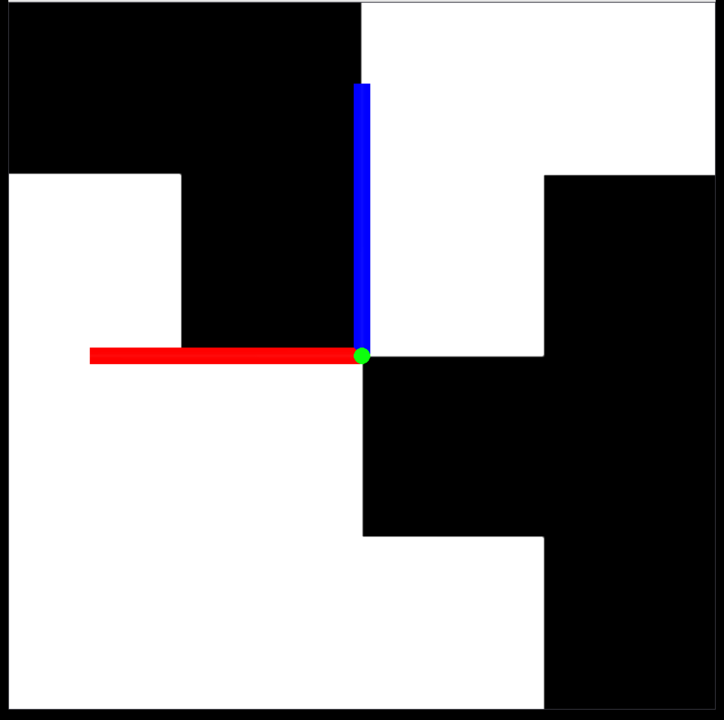
Rayrai Example: Aruco Marker
Overview
Uses an orthographic camera and flat lighting to render a textured mesh marker for detection-style pipelines. It is tuned for consistent marker appearance.
Binary
CMake target and executable name: rayrai_aruco_marker.
Run
Build and run from your build directory:
cmake --build . --target rayrai_aruco_marker
./rayrai_aruco_marker
On Windows, run rayrai_aruco_marker.exe instead.
This example uses the in-process rayrai renderer (no external client required).
Details
Adds a mesh visual as a stand-in marker and rotates it to face the camera.
Configures a directional light and disables shadows for flat lighting.
Uses an orthographic camera to render a marker-like view.
Source
#include <memory>
#include <iostream>
#include <string>
#include <Eigen/Core>
#include "rayrai/example_common.hpp"
#include "rayrai/Camera.hpp"
#include "rayrai_example_resources.hpp"
#include "raisim/World.hpp"
int main(int argc, char* argv[]) {
ExampleApp app;
if (!app.init("rayrai_aruco_marker", 1024, 1024))
return -1;
auto world = std::make_shared<raisim::World>();
world->setTimeStep(0.01);
world->setGravity({0, 0, 0});
auto viewer = std::make_shared<raisin::RayraiWindow>(world, 1024, 1024);
// Use a slightly gray background so untextured meshes don't disappear on white.
viewer->setBackgroundColor({235, 235, 235, 255});
viewer->setFogDensity(0.0f);
{
// Shine light straight onto the marker plane (front-face points +Y).
auto& light = viewer->getLight();
light.setAsDirectional(glm::vec3(0.0f, -1.0f, 0.0f), glm::vec3(1.0f, 1.0f, 1.0f));
// This is essentially a "viewer for a texture"; push ambient up so the marker reads clearly.
light.ambient = glm::vec3(0.95f, 0.95f, 0.95f);
light.diffuse = glm::vec3(1.00f, 1.00f, 1.00f);
light.specular = glm::vec3(0.05f, 0.05f, 0.05f);
// This example is a flat marker plane; shadows just make it darker.
light.setShadowsEnabled(false);
}
const std::string markerMesh =
rayraiRscPath(argv[0], "aruco_marker/aruco_marker.dae");
auto marker = viewer->addVisualMesh("aruco_marker", markerMesh, 1.0, 1.0, 1.0);
if (!marker) {
std::cerr << "[rayrai_aruco_marker] Failed to load marker mesh: " << markerMesh << std::endl;
} else {
std::cerr << "[rayrai_aruco_marker] Loaded mesh: " << markerMesh
<< " (textures=" << (marker->hasTextures() ? "yes" : "no") << ")\n";
marker->setPosition(0.0, 0.0, 1.0);
// The Collada marker plane lies in XY with +Z normal. With the default camera here
// (looking along -Y), the plane is edge-on. Rotate it so it faces the camera.
// Rotation: -90 deg about +X -> normal +Z becomes +Y.
marker->setOrientation(0.70710678, -0.70710678, 0.0, 0.0); // w, x, y, z
// Keep the texture un-tinted (the shader multiplies texture_diffuse by objectColor).
marker->setColor(1.0, 1.0, 1.0, 1.0);
marker->setDetectable(true);
}
// Add an axis indicator so it's obvious the scene is rendering even if the mesh/texture is missing.
auto frame = viewer->addCoordinateFrame("origin");
if (frame) {
raisin::CoordinateFrame::Pose pose;
pose.position = Eigen::Vector3d(0.0, 0.0, 1.0);
pose.quaternion = Eigen::Vector4d(1.0, 0.0, 0.0, 0.0); // w,x,y,z
frame->poses.push_back(pose);
frame->frameSize = 0.25;
}
// Orthographic camera aimed at the marker plane.
auto& cam = viewer->getCamera();
cam.setProjectionMode(raisin::Camera::ProjectionMode::ORTHOGRAPHIC);
cam.orthoScale = 1.0f;
cam.position = glm::vec3(0.0f, 2.0f, 1.0f);
cam.target = glm::vec3(0.0f, 0.0f, 1.0f);
cam.yaw = -90.0f;
cam.pitch = 0.0f;
cam.update(false);
while (!app.quit) {
app.processEvents();
if (app.quit)
break;
world->integrate();
app.beginFrame();
app.renderViewer(*viewer);
app.endFrame();
}
viewer.reset();
app.shutdown();
return 0;
}