
Rayrai Example: Complete Showcase
Overview
Comprehensive rayrai showcase with a sensored ANYmal (spinning LiDAR and front RGB/depth camera), heightmap terrain, YCB objects, custom visuals, instanced geometry, and a live LiDAR point cloud. Use it as an end-to-end check for rayrai and sensor rendering.
Screenshot
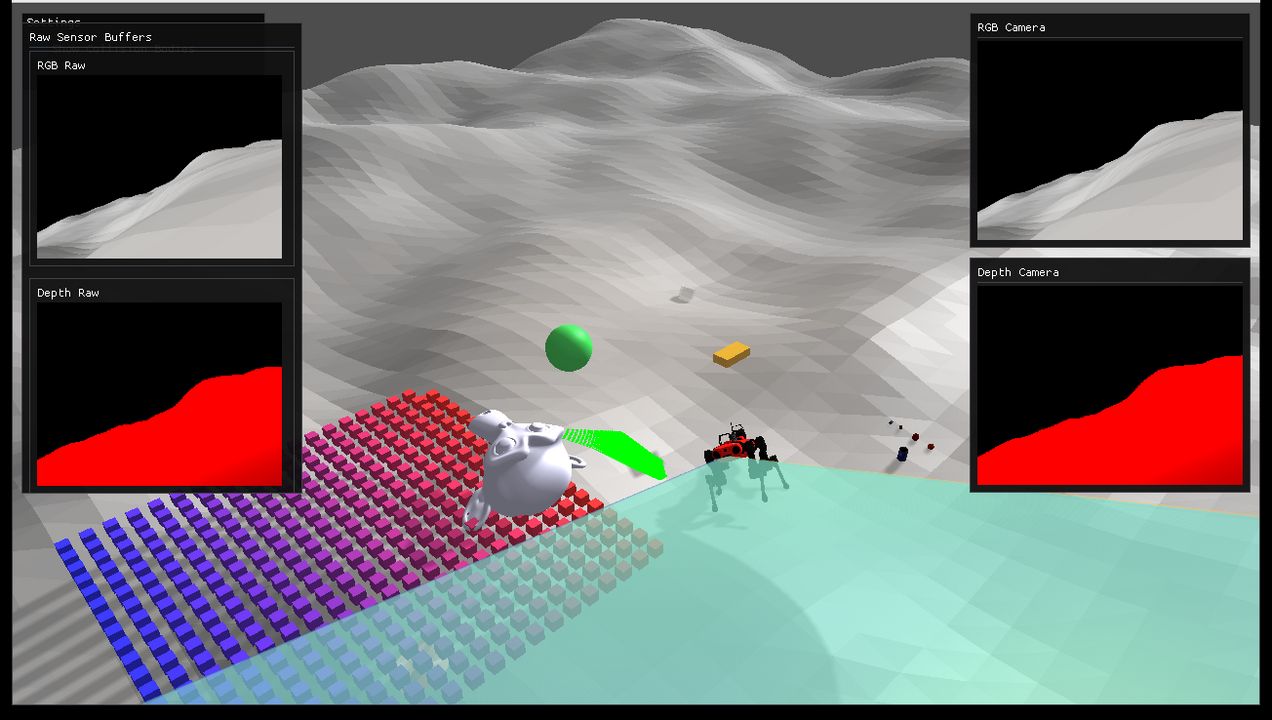
The YCB objects are licensed under CC BY 4.0 and credited in Asset Credits.
Target
CMake target: rayrai_complete_showcase.
Run
Run the build-tree executable:
./build-examples/examples/rayrai_complete_showcaseOn Windows, run rayrai_complete_showcase.exe instead. This example renders in process with rayrai and does not need rayrai_tcp_viewer.
Details
- Loads a sensored ANYmal, heightmap terrain, primitives, and YCB objects.
- Updates LiDAR scans into a point cloud and renders RGB/depth sensors.
- Draws the camera frustums in the scene and shows the RGB image, the depth image, and the raw sensor buffers in ImGui windows.
Frame capture
The example can write its rendered frames (scene plus the sensor panels) to disk so the documentation GIF can be regenerated. Capture is off unless RAYRAI_SHOWCASE_CAPTURE_DIR is set; a normal run never reads the framebuffer back. Frames are written as binary PPM, which ffmpeg reads directly.
| Environment variable | Effect |
|---|---|
RAYRAI_SHOWCASE_CAPTURE_DIR | Output directory. Setting it enables capture; the example exits once the requested frame count is written. |
RAYRAI_SHOWCASE_CAPTURE_FRAMES | Number of frames to write (default 150). |
RAYRAI_SHOWCASE_CAPTURE_SKIP | Rendered frames to skip before capturing (default 90), so assets and sensor buffers are populated in the first captured frame. |
RAYRAI_SHOWCASE_CAPTURE_EVERY | Capture every N-th frame (default 1). The loop advances one physics step per rendered frame, so a stride above 1 is what keeps the captured sequence from playing back in slow motion. At the default 5 ms time step, stride 16 puts 80 ms of simulation in every frame, which is exactly real time at 12.5 fps. |
RAYRAI_SHOWCASE_CAPTURE_DIR=/tmp/showcase_frames \
RAYRAI_SHOWCASE_CAPTURE_FRAMES=75 \
RAYRAI_SHOWCASE_CAPTURE_SKIP=120 \
RAYRAI_SHOWCASE_CAPTURE_EVERY=16 \
  ./build-examples/examples/rayrai_complete_showcase

ffmpeg -framerate 12.5 -i /tmp/showcase_frames/frame_%04d.ppm \
  -filter_complex "[0:v] scale=954:540:flags=lanczos,split [a][b];\
                   [a] palettegen=stats_mode=diff [p];\
                   [b][p] paletteuse=dither=bayer:bayer_scale=5:diff_mode=rectangle" \
  -loop 0 rsc/docs/image/rayrai_complete_showcase.gif