Rayrai Example: LiDAR Pointcloud

Overview

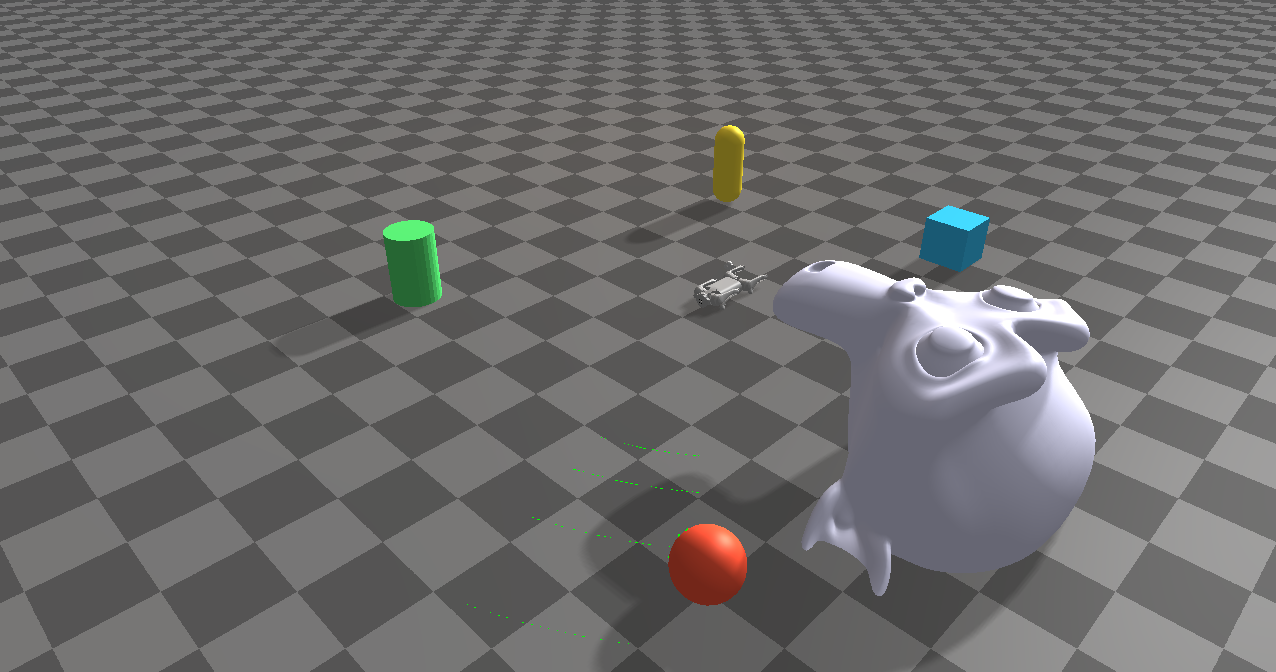
Attaches a Livox LiDAR module to Go1 and visualizes the scan as a point cloud every frame, with nearby primitives and a static mesh to generate richer returns.

Screenshot

../../../_images/rayrai_lidar_pointcloud.png

Binary

CMake target and executable name: rayrai_lidar_pointcloud.

Run

Build and run from your build directory:

cmake --build . --target rayrai_lidar_pointcloud
./rayrai_lidar_pointcloud

On Windows, run rayrai_lidar_pointcloud.exe instead. This example uses the in-process rayrai renderer (no external client required).

Details

  • Loads Go1 with a Livox LiDAR module and updates scans each frame.

  • Transforms LiDAR points from sensor to world frame.

  • Visualizes the scan as a point cloud with adjustable point size.

Source

#include <cmath>
#include <memory>
#include <string>
#include <vector>

#include <glm/glm.hpp>

#include "rayrai/example_common.hpp"
#include "rayrai_example_resources.hpp"
#include "raisim/World.hpp"

static inline glm::dvec3 toGlm(const raisim::Vec<3>& v) {
  return glm::dvec3(v[0], v[1], v[2]);
}

static inline glm::dmat3 toGlm(const raisim::Mat<3, 3>& R) {
  return glm::dmat3(glm::dvec3(R(0, 0), R(1, 0), R(2, 0)), glm::dvec3(R(0, 1), R(1, 1), R(2, 1)),
    glm::dvec3(R(0, 2), R(1, 2), R(2, 2)));
}

int main(int argc, char* argv[]) {
  ExampleApp app;
  if (!app.init("rayrai_example_lidar", 1280, 720))
    return -1;

  auto world = std::make_shared<raisim::World>();
  world->addGround();

  const std::string sep = raisim::Path::separator();
  const std::string go1Dir = rayraiRscPath(argv[0], "go1");
  std::vector<std::string> modules = {"livox_lidar"};
  auto go1 = world->addArticulatedSystem(go1Dir + sep + "go1.urdf", modules, go1Dir);
  go1->setGeneralizedCoordinate({0, 0, 0.32, 1.0, 0.0, 0.0, 0.0, 0, 0.67, -1.3, 0, 0.67, -1.3, 0,
    0.67, -1.3, 0, 0.67, -1.3});

  auto lidar = go1->getSensorSet("livox_lidar_0")->getSensor<raisim::SpinningLidar>("lidar");

  auto sphere = world->addSphere(0.2, 1);
  sphere->setPosition(2.5, 2.0, 0.6);
  sphere->setAppearance("0.9,0.3,0.2,1.0");

  auto box = world->addBox(0.4, 0.4, 0.4, 1);
  box->setPosition(-2.0, 1.0, 0.4);
  box->setAppearance("0.2,0.7,0.9,1.0");

  auto cylinder = world->addCylinder(0.2, 0.6, 1);
  cylinder->setPosition(1.8, -1.8, 0.3);
  cylinder->setAppearance("0.3,0.8,0.4,1.0");

  auto capsule = world->addCapsule(0.15, 0.5, 1);
  capsule->setPosition(-1.6, -1.3, 0.45);
  capsule->setAppearance("0.9,0.8,0.2,1.0");

  std::string monkeyFile = rayraiRscPath(argv[0], "monkey/monkey.obj");
  raisim::Mat<3, 3> inertia;
  inertia.setIdentity();
  const raisim::Vec<3> com = {0, 0, 0};
  auto monkey = world->addMesh(monkeyFile, 1.0, inertia, com);
  monkey->setPosition(0.8, 2.2, 0.35);
  monkey->setAppearance("0.8,0.8,0.9,1.0");
  monkey->setBodyType(raisim::BodyType::STATIC);

  auto viewer = std::make_shared<raisin::RayraiWindow>(world, 1280, 720);
  viewer->setBackgroundColor({25, 25, 35, 255});

  auto lidarCloud = viewer->addPointCloud("lidar_scan");
  if (lidarCloud) {
    lidarCloud->pointSize = 3.0f;
    lidarCloud->setDetectable(true);
  }

  while (!app.quit) {
    app.processEvents();
    if (app.quit)
      break;

    world->integrate();

    lidar->updatePose();
    const glm::dvec3 sensorPosW = toGlm(lidar->getPosition());
    const glm::dmat3 sensorRotW = toGlm(lidar->getOrientation());
    lidar->update(*world);

    if (lidarCloud) {
      const auto& scanS = lidar->getScan();
      lidarCloud->positions.clear();
      lidarCloud->colors.clear();
      lidarCloud->positions.reserve(scanS.size());
      lidarCloud->colors.reserve(scanS.size());

      const glm::vec4 kColor(0.f, 1.f, 0.f, 1.f);
      for (const auto& ps : scanS) {
        const glm::dvec3 pS(ps[0], ps[1], ps[2]);
        const glm::dvec3 pW = sensorRotW * pS + sensorPosW;
        lidarCloud->positions.emplace_back(glm::vec3(pW));
        lidarCloud->colors.emplace_back(kColor);
      }

      lidarCloud->updatePointBuffer();
    }

    app.beginFrame();
    app.renderViewer(*viewer);
    app.endFrame();
  }

  viewer.reset();
  app.shutdown();
  return 0;
}