
Rayrai Example: Basic Scene

Overview

Minimal scene with Go1 on a textured ground plane. It is a quick sanity check for loading a robot and rendering a basic environment.

Screenshot
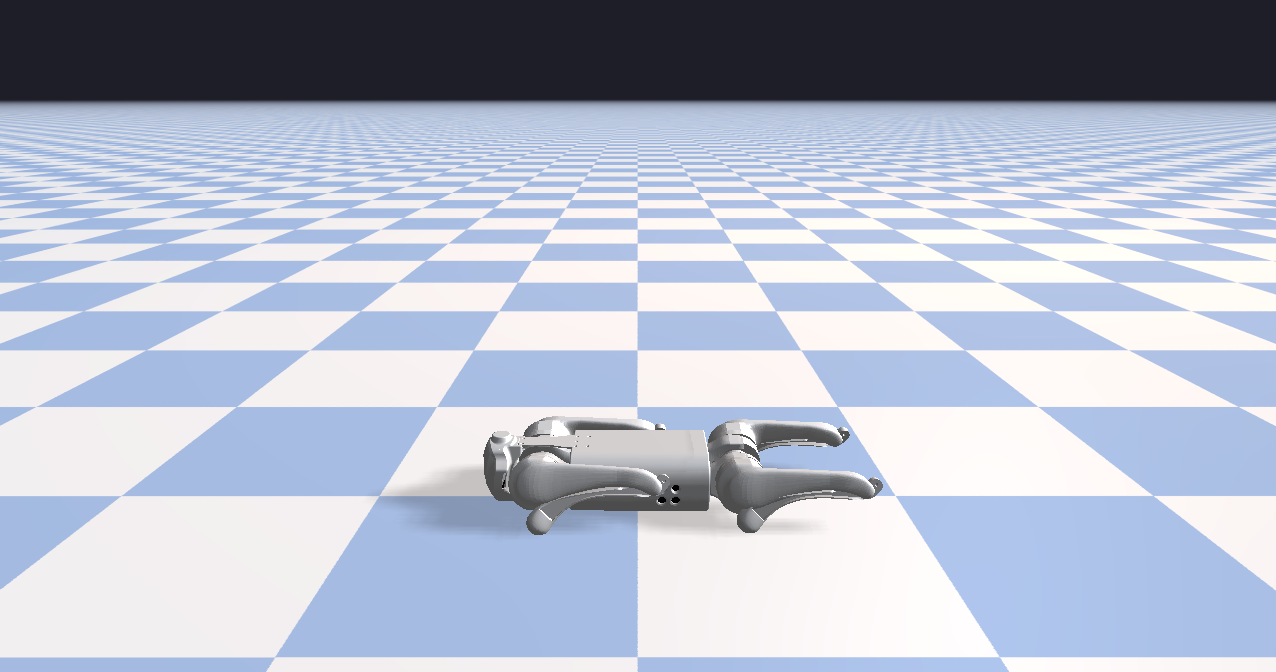
../../../_images/rayrai_basic_scene.png

Binary

CMake target and executable name: rayrai_basic_scene.

Run

Build and run from your build directory:

cmake --build . --target rayrai_basic_scene
./rayrai_basic_scene

On Windows, run rayrai_basic_scene.exe instead. This example uses the in-process rayrai renderer (no external client required).

Details

  • Loads the Go1 URDF, sets a nominal standing pose, and adds a ground plane.

  • Sets a background color and a checkerboard ground texture.

  • Minimal render loop for a basic rayrai scene.

Source

#include <memory>
#include <string>

#include "rayrai/example_common.hpp"
#include "rayrai_example_resources.hpp"
#include "raisim/World.hpp"

int main(int argc, char* argv[]) {
  ExampleApp app;
  if (!app.init("rayrai_example_charging_station", 1280, 720))
    return -1;

  auto world = std::make_shared<raisim::World>();
  world->addGround();

  const std::string urdfPath = rayraiRscPath(argv[0], "go1/go1.urdf");
  auto robot = world->addArticulatedSystem(urdfPath);
  if (robot) {
    robot->setGeneralizedCoordinate({0, 0, 0.32, 1.0, 0.0, 0.0, 0.0, 0, 0.67, -1.3, 0, 0.67, -1.3, 0,
      0.67, -1.3, 0, 0.67, -1.3});
  }

  auto viewer = std::make_shared<raisin::RayraiWindow>(world, 1280, 720);
  viewer->setBackgroundColor({30, 30, 40, 255});
  viewer->setGroundPatternResourcePath(
    rayraiRscPath(argv[0], "minitaur/vision/checker_blue.png"));

  while (!app.quit) {
    app.processEvents();

    world->integrate();

    app.beginFrame();
    app.renderViewer(*viewer);
    app.endFrame();
  }

  viewer.reset();
  app.shutdown();
  return 0;
}