
Rayrai Example: CoACD Mesh Approximation
Overview
Compares original triangle meshes with their CoACD convex approximation output. Use it to visually inspect collision approximations generated from YCB meshes.
Screenshot
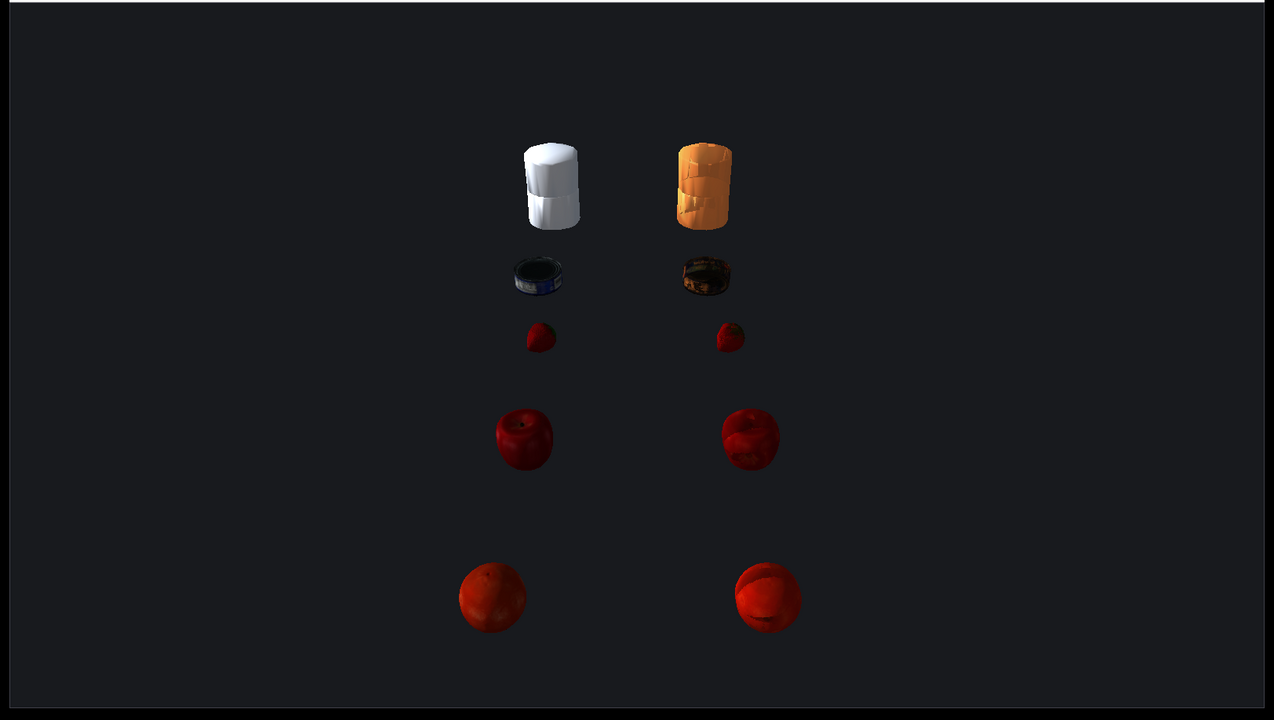
The YCB objects are licensed under CC BY 4.0 and credited in Asset Credits.
Target
CMake target: rayrai_coacd_mesh_approximation.
Run
Run the build-tree executable:
./build-examples/examples/rayrai_coacd_mesh_approximationOn Windows, run rayrai_coacd_mesh_approximation.exe instead. This example renders in process with rayrai and does not need rayrai_tcp_viewer.
First run and caching
The example builds the world and generates every CoACD part before it opens the window. It first prints Generating CoACD collision parts; the first run can take a few minutes... and then one line per mesh. On the first run this phase can take a few minutes; press Ctrl-C to stop it. World::addMesh caches each result beside its source mesh as a raisim_coacd_* OBJ file, here in the build tree's copied rsc/ycb directory, so later runs in the same build tree load the saved parts directly. See Single-Body Objects for the cache format.
Details
- Loads five YCB OBJ meshes: master chef can, tuna fish can, strawberry, apple, and orange.
- Calls
World::addMeshdirectly for both the original triangle mesh and the CoACD convex approximation mesh. - Passes
raisim::CoacdOptionsintoaddMeshso the mesh processing stays inside RaiSim rather than in application-side rendering code. - Prints the number of generated convex parts for each mesh.
- Displays the original meshes in gray beside the translucent orange CoACD convex approximation parts.
What this example is not
This is not a manual mesh-processing example. Application code should not need to load OBJ vertices, split convex parts, or build OpenGL meshes directly just to use CoACD collision. The intended user-facing workflow is:
raisim::CoacdOptions options;
options.maxConvexHull = 12;
auto* mesh = world->addMesh(path, mass, scale, "",
                            raisim::MeshCollisionMode::CONVEXIFY,
                            collisionGroup, collisionMask, options);
The rayrai side then visualizes the resulting RaiSim object.