Rayrai Example: PBR Texture Maps
Overview
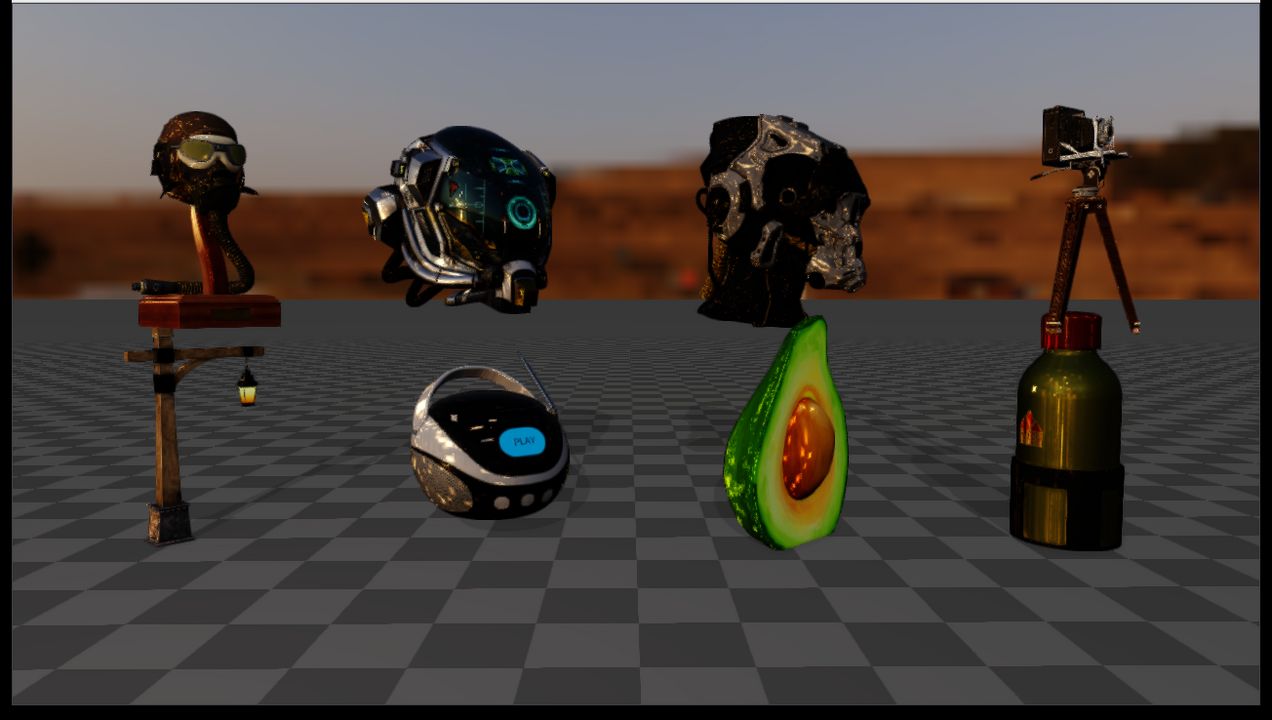
Loads eight Khronos glTF Sample Assets in one interactive rayrai scene. The example is an asset inspector for textured PBR import, HDR image-based lighting, normal maps, metallic-roughness maps, occlusion maps, emissive maps, and mixed asset scales/units.
Each asset keeps its license file under rsc/rayrai/pbr. Most are CC0, but
DamagedHelmet is licensed under CC BY 4.0 and CC BY-NC 4.0, and
AntiqueCamera contains a UX3D trademark. Check those files before
redistributing the assets.
Screenshot
Target
CMake target: rayrai_pbr_texture_maps.
Run
Run the build-tree executable:
./build-examples/examples/rayrai_pbr_texture_maps
On Windows, run rayrai_pbr_texture_maps.exe instead.
This example renders in process with rayrai and does not need rayrai_tcp_viewer.
Pass --screenshot PATH to render with a hidden window, wait until every
asset has loaded, save the final image as a PNG, and exit:
./build-examples/examples/rayrai_pbr_texture_maps --screenshot /tmp/pbr_texture_maps.png
Details
Loads these glTF assets from
rsc/rayrai/pbr:FlightHelmet,DamagedHelmet,SciFiHelmet,AntiqueCamera,Lantern,BoomBox,Avocado, andWaterBottle.Applies a fixed per-asset scale so that each model’s longest authored extent has about the same preview size, and lays the eight assets out in two rows of four that slowly turn about the vertical axis.
Keeps assets upright in rayrai’s and RaiSim’s Z-up coordinate convention.
Uses the Ultra quality preset with tuned exposure and shadows and one additional warm point light.
Adds
rsc/rayrai/hdr/polyhaven/potsdamer_platz_1k.hdras an HDR environment. The HDR is used both for the visible background and for PBR reflections through environment, irradiance, prefiltered environment, and BRDF lookup textures.Lets the user orbit the camera to inspect the assets; this is the preferred example for checking whether imported PBR texture maps are actually active.