Rayrai Example: Rolling And Spinning Friction
Overview
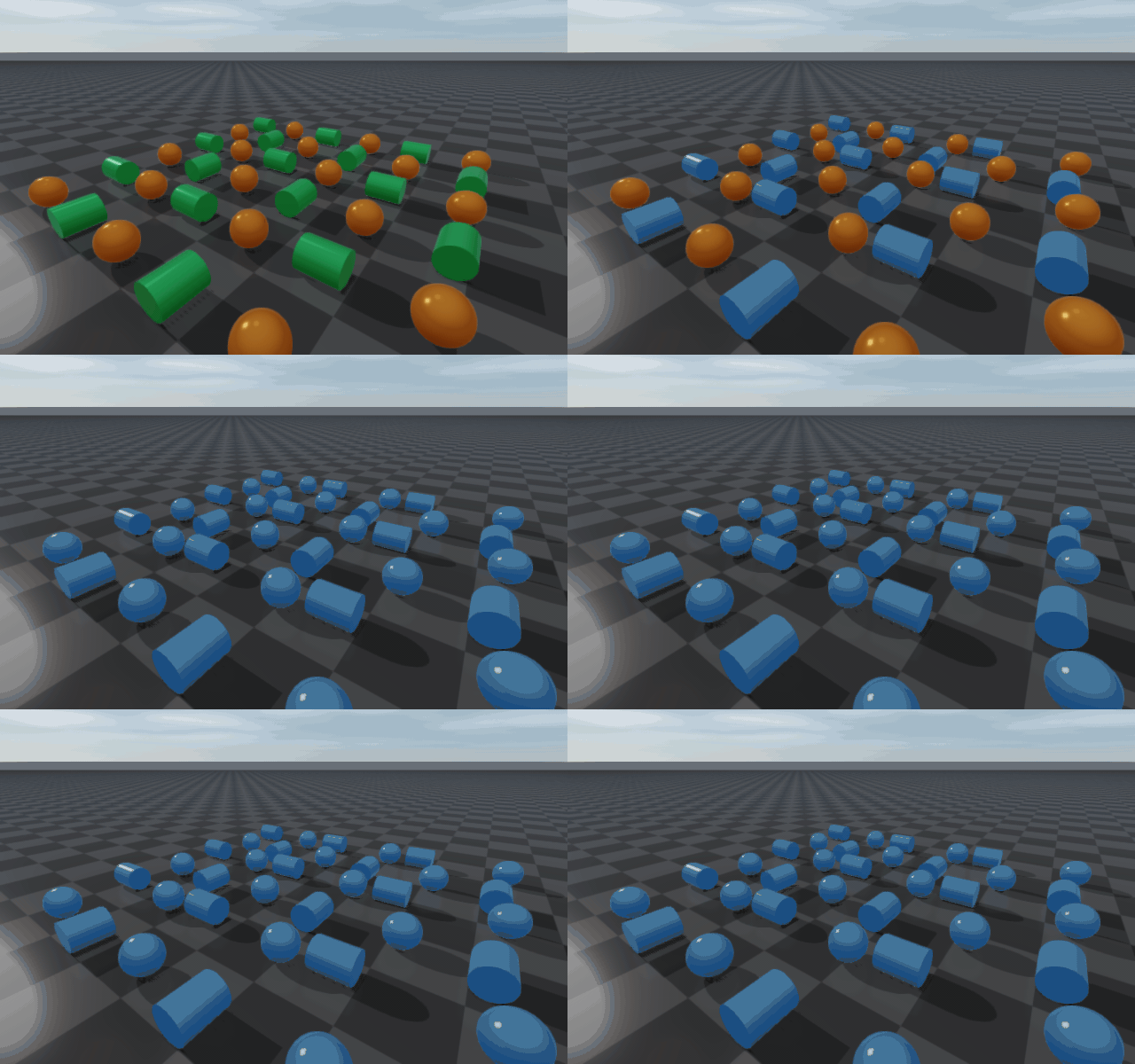
This example visualizes native rolling and spinning friction on a grid of spheres and cylinders, all spawned with initial linear and angular velocity. As the bodies dissipate energy through these friction modes they slow down, come to rest, and are recolored to indicate sleeping. The demo restarts on a fixed cadence so the motion and its decay are easy to compare.
The GIF below uses a smaller 6 × 6 grid. A headless image generator rebuilds it during the documentation build:
Target
CMake target: rayrai_rolling_spinning_friction.
Run
Run the build-tree executable:
./build-examples/examples/rayrai_rolling_spinning_friction
On Windows, run rayrai_rolling_spinning_friction.exe instead.
This example renders in process with rayrai and does not need rayrai_tcp_viewer.
Command-line options:
./build-examples/examples/rayrai_rolling_spinning_friction \
  --grid=12             \
  --steps=2500          \
  --steps-per-frame=16  \
  --hold-frames=120
--grid— N × N body grid (default10). Larger values exercise the solver harder; the GIF on this page uses a 6 × 6 grid for clarity.--steps— physics steps per cycle (default2500). One cycle is one full reset → run-until-rest sequence.--steps-per-frame— physics steps per render frame (default16). Higher values speed up the visible motion at the cost of frame-to-frame smoothness.--hold-frames— frames to wait after each cycle before resetting (default120).
How it works
The rolling/spinning friction comes from the material-pair property set
up in main():
world->setMaterialPairProp("ground", "body",
                           1.0,    // dynamic friction
                           0.0,    // restitution
                           0.0,    // restitution threshold
                           1.0,    // static friction
                           1e-3,   // static-friction threshold velocity
                           0.12,   // rolling friction (mu_r)
                           0.08);  // spinning friction (mu_spin)
The last two arguments are the rollingFriction and spinningFriction
coefficients introduced in v2.3.0. Both are zero in every other
setMaterialPairProp overload, so existing scenes behave exactly as before;
setting them switches the solver onto the extended path for that pair. See
Material System for the full contact-impulse derivation.
The scene is built once at startup:
A
checkerboard-textured ground plane with thegroundmaterial.An
N × Ngrid of unit-mass primitives alternating sphere/cylinder by checker pattern, all in thebodymaterial. Cylinders are oriented so that the initial angular velocity rolls them along the floor instead of spinning in place; spheres receive linear + angular velocity in two axes.Sleeping is enabled with mild thresholds (
setSleepingParameters(0.012,
0.03, 25)
), so bodies that come to rest stop integrating and switch to a blue appearance.
Each rendered frame integrates --steps-per-frame physics steps,
updates the sleep appearance, and shows aggregate statistics in an ImGui
overlay. Abridged from the source:
while (!app.quit) {
  app.processEvents();
  if (app.quit) break;

  if (stepInCycle < cycleSteps) {
    for (int i = 0; i < stepsPerFrame; ++i) {
      world->integrate();
      lastContacts = world->getContactProblem()->size();
      contactTotal += lastContacts;
      ++stepInCycle;
    }
  } else if (++heldFrames >= holdFrames) {
    resetDemo(*world, bodies, grid);   // re-fire the cycle
    stepInCycle = 0;
    heldFrames = 0;
  }

  updateSleepingAppearance(*world, bodies);
  computeMeanSpeeds(bodies, meanLinearSpeed, meanAngularSpeed);

  app.beginFrame();
  app.renderViewer(*viewer);
  // ... ImGui overlay with step / contacts / speeds ...
  app.endFrame();
}
What to look for
Rolling bodies come to rest. Sliding friction first turns the initial skid into rolling; rolling friction then removes energy from the rolling motion, so linear and angular speed decay together. Without rolling friction, a body rolling without slipping would keep rolling.
Spheres stop spinning about the vertical axis. Each sphere also starts with spin about the contact normal. Spinning friction applies a torque about the normal that removes this spin; without it, a sphere would keep spinning in place after it stops rolling.
Sleeping bodies turn blue. RaiSim’s sleep detector fires when the averaged velocity drops below the configured thresholds; sleeping bodies skip integration and stay on the cheaper path until the next cycle reset.
Average contact count and mean speeds are shown in the ImGui overlay so you can watch energy dissipate over the cycle.
Full source
This is the complete source used by the build-tree target:
  1#include <algorithm>
  2#include <cstdlib>
  3#include <memory>
  4#include <string>
  5#include <vector>
  6
  7#include <glm/glm.hpp>
  8
  9#include "raisim/World.hpp"
 10#include "rayrai/PhysicsSnapshot.hpp"
 11#include "rayrai/example_common.hpp"
 12#include "rayrai_example_compat.hpp"
 13
 14namespace {
 15
 16struct DemoBody {
 17  raisim::SingleBodyObject* object = nullptr;
 18  std::string activeAppearance;
 19  bool sleeping = false;
 20  bool sphereShape = false;
 21  int x = 0;
 22  int y = 0;
 23};
 24
 25int readIntArg(int argc, char** argv, const char* name, int fallback) {
 26  const std::string prefix = std::string(name) + "=";
 27  for (int i = 1; i < argc; ++i) {
 28    const std::string arg(argv[i]);
 29    if (arg == name && i + 1 < argc) return std::max(1, std::atoi(argv[++i]));
 30    if (arg.rfind(prefix, 0) == 0) return std::max(1, std::atoi(arg.c_str() + prefix.size()));
 31  }
 32  return fallback;
 33}
 34
 35void resetBody(raisim::World& world, DemoBody& body, int grid) {
 36  const double spacing = 1.1;
 37  const double origin = -0.5 * spacing * double(grid - 1);
 38  const int x = body.x;
 39  const int y = body.y;
 40
 41  if (body.sphereShape) {
 42    body.object->setPosition(origin + spacing * x, origin + spacing * y, 0.25);
 43    body.object->setOrientation(1.0, 0.0, 0.0, 0.0);
 44    body.object->setVelocity(1.7 + 0.08 * x, 0.4 + 0.05 * y, 0.0, 0.0, -11.0, 18.0);
 45  } else if ((x & 1) == 0) {
 46    // Cylinder axis lies along world X, so angular velocity about X visibly rolls it along Y.
 47    body.object->setOrientation(0.7071067812, 0.0, 0.7071067812, 0.0);
 48    body.object->setPosition(origin + spacing * x, origin + spacing * y, 0.22);
 49    body.object->setVelocity(0.15 + 0.04 * x, 1.9 + 0.07 * y, 0.0, 14.0, 0.0, 0.0);
 50  } else {
 51    // Cylinder axis lies along world Y, so angular velocity about Y visibly rolls it along X.
 52    body.object->setOrientation(0.7071067812, -0.7071067812, 0.0, 0.0);
 53    body.object->setPosition(origin + spacing * x, origin + spacing * y, 0.22);
 54    body.object->setVelocity(1.9 + 0.07 * x, 0.15 + 0.04 * y, 0.0, 0.0, -14.0, 0.0);
 55  }
 56
 57  body.sleeping = false;
 58  body.object->setAppearance(body.activeAppearance);
 59  world.wakeObject(body.object);
 60}
 61
 62std::vector<DemoBody> createBodies(raisim::World& world, int grid) {
 63  std::vector<DemoBody> bodies;
 64  bodies.reserve(static_cast<size_t>(grid * grid));
 65
 66  for (int y = 0; y < grid; ++y) {
 67    for (int x = 0; x < grid; ++x) {
 68      const bool sphereShape = ((x + y) & 1) == 0;
 69      DemoBody body;
 70      body.sphereShape = sphereShape;
 71      body.x = x;
 72      body.y = y;
 73      body.activeAppearance = sphereShape ? "0.95, 0.42, 0.12, 1.0" : "0.15, 0.70, 0.28, 1.0";
 74      if (sphereShape) {
 75        body.object = world.addSphere(0.25, 1.0, "body");
 76      } else {
 77        body.object = world.addCylinder(0.22, 0.55, 1.0, "body");
 78      }
 79      body.object->setAppearance(body.activeAppearance);
 80      bodies.push_back(body);
 81      resetBody(world, bodies.back(), grid);
 82    }
 83  }
 84
 85  return bodies;
 86}
 87
 88void resetDemo(raisim::World& world, std::vector<DemoBody>& bodies, int grid) {
 89  world.setWorldTime(0.0);
 90  for (auto& body : bodies) resetBody(world, body, grid);
 91  world.wakeAll();
 92}
 93
 94void updateSleepingAppearance(raisim::World& world, std::vector<DemoBody>& bodies) {
 95  for (auto& body : bodies) {
 96    const bool sleeping = world.isObjectSleeping(body.object);
 97    if (sleeping != body.sleeping) {
 98      body.object->setAppearance(sleeping ? "0.20, 0.55, 1.00, 1.0" : body.activeAppearance);
 99      body.sleeping = sleeping;
100    }
101  }
102}
103
104void computeMeanSpeeds(const std::vector<DemoBody>& bodies, double& linearSpeed, double& angularSpeed) {
105  linearSpeed = 0.0;
106  angularSpeed = 0.0;
107  if (bodies.empty()) return;
108
109  for (const auto& body : bodies) {
110    linearSpeed += body.object->getLinearVelocity().norm();
111    angularSpeed += body.object->getAngularVelocity().norm();
112  }
113
114  linearSpeed /= double(bodies.size());
115  angularSpeed /= double(bodies.size());
116}
117
118}  // namespace
119
120int main(int argc, char* argv[]) {
121  const int grid = readIntArg(argc, argv, "--grid", 10);
122  const int cycleSteps = readIntArg(argc, argv, "--steps", 2500);
123  const int stepsPerFrame = readIntArg(argc, argv, "--steps-per-frame", 16);
124  const int holdFrames = readIntArg(argc, argv, "--hold-frames", 120);
125
126  ExampleApp app;
127  if (!app.init("rayrai_rolling_spinning_friction", 1280, 720)) return -1;
128
129  auto world = std::make_shared<raisim::World>();
130  world->setTimeStep(0.001);
131  world->setERP(0.0, 0.0);
132  world->setContactSolverParam(1.0, 1.0, 1.0, 120, 1e-10);
133  world->setGravity({0.0, 0.0, -9.81});
134  world->setSleepingEnabled(true);
135  world->setSleepingParameters(0.012, 0.03, 25);
136  auto* ground = world->addGround(0.0, "ground");
137  ground->setAppearance("checkerboard");
138  world->setMaterialPairProp("ground", "body", 1.0, 0.0, 0.0, 1.0, 1e-3, 0.12, 0.08);
139
140  std::vector<DemoBody> bodies = createBodies(*world, grid);
141
142  // The renderer owns an empty world; physics reaches it only through copied snapshots.
143  raisin::PhysicsSnapshotCapture snapshotCapture;
144  auto viewer = std::make_shared<raisin::RayraiWindow>(std::make_shared<raisim::World>(), 1280, 720);
145  viewer->setRenderQualitySettings(raisin::RayraiWindow::defaultRenderQualitySettings(raisin::RayraiWindow::RenderQualityPreset::Balanced));
146  raisim_examples::setRayraiBackgroundColorRgb255(*viewer, {24, 26, 30, 255});
147  raisim_examples::addRayraiBasicSceneLights(*viewer);
148
149  auto& camera = viewer->getCamera();
150  camera.position = glm::vec3(6.0f, -8.5f, 5.0f);
151  camera.target = glm::vec3(0.0f, 0.0f, 0.25f);
152  camera.yaw = 125.0f;
153  camera.pitch = -31.0f;
154  camera.zoom = 42.0f;
155  camera.zNear = 0.03f;
156  camera.zFar = 35.0f;
157  camera.setCameraFixedTarget(true);
158  camera.setCameraFixedDistance(true);
159  camera.update(false);
160
161  int stepInCycle = 0;
162  int heldFrames = 0;
163  std::size_t contactTotal = 0;
164  std::size_t lastContacts = 0;
165  double meanLinearSpeed = 0.0;
166  double meanAngularSpeed = 0.0;
167
168  while (!app.quit) {
169    app.processEvents();
170    if (app.quit) break;
171
172    if (stepInCycle < cycleSteps) {
173      const int frameSteps = std::min(stepsPerFrame, cycleSteps - stepInCycle);
174      for (int i = 0; i < frameSteps; ++i) {
175        world->integrate();
176        lastContacts = world->getContactProblem()->size();
177        contactTotal += lastContacts;
178        ++stepInCycle;
179      }
180      heldFrames = 0;
181    } else if (++heldFrames >= holdFrames) {
182      resetDemo(*world, bodies, grid);
183      stepInCycle = 0;
184      heldFrames = 0;
185      contactTotal = 0;
186      lastContacts = 0;
187    }
188
189    updateSleepingAppearance(*world, bodies);
190    computeMeanSpeeds(bodies, meanLinearSpeed, meanAngularSpeed);
191
192    const auto snapshot = snapshotCapture.capture(*world);
193    viewer->applyPhysicsSnapshot(snapshot);
194
195    app.beginFrame();
196    app.renderViewer(*viewer);
197
198    ImGui::SetNextWindowPos(ImVec2(12, 12), ImGuiCond_Always);
199    ImGui::SetNextWindowBgAlpha(0.72f);
200    ImGui::Begin("Rolling friction", nullptr, ImGuiWindowFlags_NoResize | ImGuiWindowFlags_AlwaysAutoResize | ImGuiWindowFlags_NoCollapse);
201    ImGui::Text("step %d / %d", stepInCycle, cycleSteps);
202    ImGui::Text("bodies: %zu", bodies.size());
203    ImGui::Text("contacts: %zu", lastContacts);
204    ImGui::Text("average contacts: %.2f", stepInCycle > 0 ? double(contactTotal) / double(stepInCycle) : 0.0);
205    ImGui::Text("mean linear speed: %.3f m/s", meanLinearSpeed);
206    ImGui::Text("mean angular speed: %.3f rad/s", meanAngularSpeed);
207    ImGui::End();
208
209    app.endFrame();
210  }
211
212  viewer.reset();
213  app.shutdown();
214  return 0;
215}