
Water
rayrai draws oceans and rectangular bodies of water such as pools, ponds and tanks. The surface moves with trochoidal (Gerstner) waves, reflects the sky and the objects on screen, and refracts the scene below it. The water absorbs and scatters light, so a shallow floor shows through tinted and a deep one fades into the color of the water. Waves gather sunlight into caustics on the floor, and foam forms along shorelines and on compressed wave crests. A camera below the surface looks through murky water and up through Snell's window.
A rectangle can also be simulated as shallow water (see Flowing water): the water runs downhill over the scene under it, parts around rocks and bodies, and its ripples and foam drift with the current.
Water is drawn by every color render: the viewer window, renderWithExternalCamera, RGB sensors and reflection-probe captures. It is a visual only. It does not affect the physics, does not cast shadows, and is not seen by depth, segmentation or LiDAR renders. To let it act on bodies, query it (sampleWaterSurface, sampleWaterFlow) and apply the forces yourself.
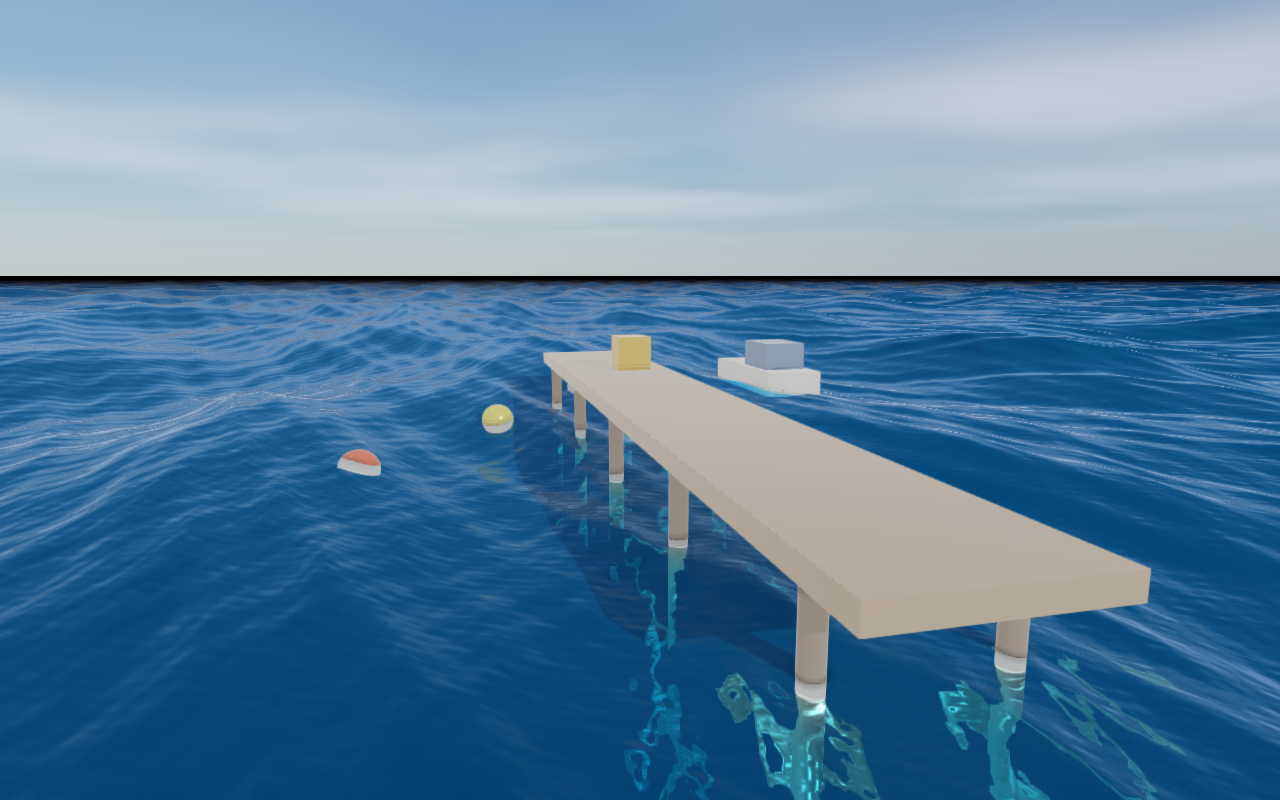
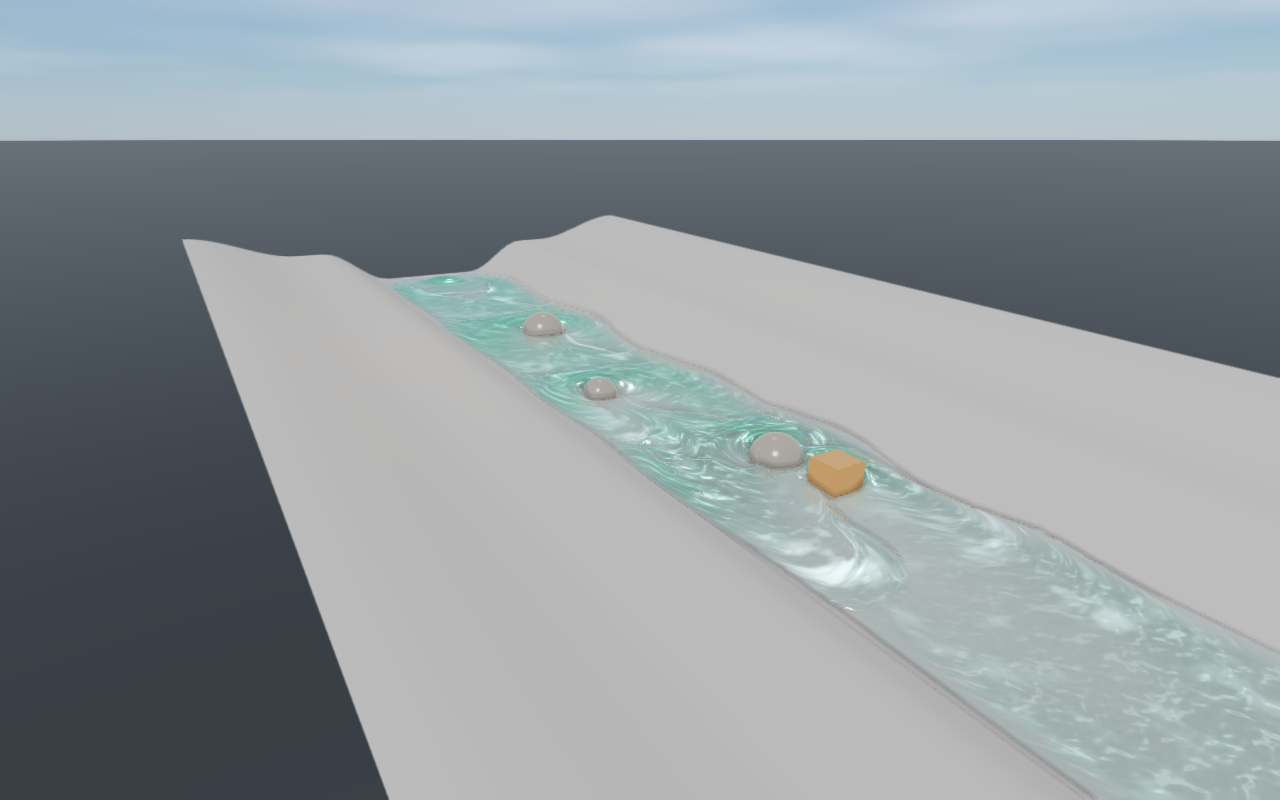
Rayrai Example: Water Pond puts a pond in a meadow, with trees and a jetty on its banks and the sun glittering on the water. Rayrai Example: Water Stream runs a simulated creek down a hillside into a pool, with wooden balls floating down it.
Quick start
#include <rayrai/RayraiWindow.hpp>

auto world = std::make_shared<raisim::World>();
world->addGround(-10.0);                // sea floor
raisin::RayraiWindow viewer(world, 1280, 720);

raisin::WaterBody sea = raisin::defaultWaterBody(raisin::WaterPreset::Ocean);
sea.center = {0.0, 0.0, 0.0};          // mean sea level at z = 0
viewer.setWaterBody("sea", sea);

while (true) {
  world->integrate();
  // The surface moves only when its clock changes; follow the simulation time.
  viewer.setWaterTimeSeconds(world->getWorldTime());
  viewer.update(1280, 720, false, 0, 0, false);
}
setWaterBody(name, body) adds a body, or replaces the one with that name. removeWaterBody, clearWaterBodies, findWaterBody, waterBodyCount and waterBodyNames manage the list, and swapWorld clears it. An invalid body (out-of-range field, more than 32 waves, an empty name) throws std::invalid_argument and is not stored. validateWaterBody(body) runs the same check without a window and names the first invalid field.
defaultWaterBody(preset) gives a starting point:
| Preset | Shape | Look |
|---|---|---|
Ocean | ocean | Deep blue sea, 16 wind waves from 0.8 m to 24 m long and up to 0.3 m high. |
CalmLake | ocean | Green-blue lake water with small waves. |
Pool | 10 m x 5 m rectangle, 1.5 m deep | Clear water, slight ripples, strong caustics. |
MurkyPond | ocean | Brown-green turbid water that hides the floor within about a metre. |
Shape and placement
WaterBody::shape is Ocean or Rectangle.
- Ocean: an infinite plane at height
center.zthat reaches the horizon. Its surface is drawn well past the camera's far plane. - Rectangle: the surface spans
halfExtentsaround(center.x, center.y), turned byyawRadiansabout +Z, and the water fills the box down todepthbelow it. The walls and the floor are your own scene geometry; setdepthto the depth of the basin. Waves die out withinedgeFadeDistanceof the edges, so the surface meets the walls at its rest level.
Wave directions are given in the body frame: the world frame for an ocean, the turned rectangle frame for a rectangle.
Waves
The surface is a sum of up to 32 Gerstner waves (WaterBody::waves). In a Gerstner wave, each point of the surface moves on a circle as the wave passes. Wave i has:
- a travel
direction(normalized, in the body frame), - a
wavelengthλ (crest to crest, metres), - an
amplitudeA (crest height above the mean level), - a
steepnessin [0, 1], - a
phaseoffset.
With k = 2π/λ, a point that rests at horizontal position p rises to A cos θ and moves horizontally by −(steepness/k) sin θ along the travel direction, where θ = k (d·p) − ω t + phase.
Waves travel at the deep-water speed: ω = sqrt(g k), so a 10 m wave moves at 4 m/s and a 1 m wave at 1.25 m/s. The horizontal motion gathers the points at the crests and spreads them in the troughs. Steepness 0 gives a sine wave; steepness 1 gives a cusped crest.
Where crests whose steepness adds up to more than 1 meet, the surface folds over itself. Folding cannot happen when the steepness of all waves adds up to 1 or less.
generateGerstnerWaves(WaterWaveSpectrum) creates a wind-driven set of waveCount waves (1 to 32, 16 by default), longest wave first:
- Direction: the first wave travels along
windAngleRadians. The others are turned by random angles withindirectionSpreadRadians. - Wavelength: decreases from
maxWavelengthtominWavelengthalong the list. - Amplitude: decreases from
maxAmplitudetominAmplitude. - Steepness: rises from
longWaveSteepnesstoshortWaveSteepness. - Shape of the decrease: the exponents
wavelengthFalloff,amplitudeFalloffandsteepnessFalloffset how quickly each quantity changes; larger values give more short waves. - Jitter:
randomness(0 to 1) jitters each wave's place in the list, so the wavelengths are not evenly spaced. - Steepness cap: the steepness is scaled down so that the sum stays within
maxSteepnessSum, which is 1 by default, so a generated surface never folds.
The same seed always gives the same waves on every platform.
Water time
The surface depends only on the water time, which changes only through setWaterTimeSeconds and advanceWaterTime. A render at a given water time is therefore repeatable. To keep the water in step with the simulation, set it from the world time:
viewer.setWaterTimeSeconds(world.getWorldTime());waterTimeSeconds() returns the current water time. Phases are evaluated in double precision, so the surface stays smooth after days of water time.
Querying the surface
sampleWaterSurface(body, worldXY, timeSeconds) returns the surface above a horizontal position. It finds the rest point that the waves carry to that position, so it reports the surface exactly as it is drawn. The sample holds:
height: the world z of the surface;normal: the surface normal;compression: the horizontal area of the surface relative to its rest area, below 1 at crests;inside: false outside a rectangle.
maxWaterWaveHeight(body) returns the largest height of the surface above its mean level, the sum of the wave amplitudes, for example to keep props or cameras clear of the crests.
RayraiWindow::sampleWaterSurface(worldXY) samples all bodies at the current water time and returns the highest surface. Use it to place floating props, to switch effects when the camera dips under water, or to compute buoyancy forces yourself.
How water looks
The water is modelled as a medium that absorbs and scatters light. The two coefficients are given per metre in linear RGB:
absorptionremoves light. Pure water absorbs red within a few metres and blue only over tens of metres, which is why clear water is blue.scatteringredirects light. It makes the water glow in its own color and look milky when strong.
The floor seen through water is dimmed by exp(−(absorption + scattering) × path), once on the light's way down and once on the view's way back up. Light scattered toward the camera gives deep water its color. That light comes from the sun and the sky entering through the surface, weighted by the Henyey-Greenstein phase function with scatteringAnisotropy g. Light scattered more than once is included approximately.
Absorption length, the depth over which light falls to 37%, is 1/absorption. A few reference values:
| Water | absorption (1/m, R G B) | scattering (1/m, R G B) |
|---|---|---|
Clear ocean (Ocean preset) | 0.45 0.07 0.035 | 0.02 0.045 0.07 |
Swimming pool (Pool) | 0.38 0.055 0.02 | 0.002 0.003 0.004 |
Lake (CalmLake) | 0.55 0.11 0.20 | 0.06 0.10 0.07 |
Turbid pond (MurkyPond) | 0.9 0.7 1.3 | 0.35 0.42 0.22 |
The surface reflects and refracts by Fresnel's law for indexOfRefraction (1.333 for water):
- Reflection: about 2% of the light at normal incidence, rising to everything at grazing angles. The sky is reflected everywhere. Objects visible on screen are reflected too (
waterScreenSpaceReflections). Objects off screen show only the sky behind them. - Refraction: the scene below bends at the surface. An object that sticks out of the water in front of it is not pulled into the refraction.
- Roughness:
roughnesssets the microfacet roughness at rest. Waves and ripples too fine for a pixel widen the reflections of the sun and sky at a distance instead of flickering.
Small ripples that are too short for the wave list come from a tiling ripple pattern (rippleStrength, rippleScale, rippleDirection). It drifts at the speed of real ripples of its size.
Foam, caustics and shorelines
- Shoreline foam: where the water is shallower than
shorelineFoamDepth, foam lines the shore and every object that pierces the surface. - Crest foam: where a crest compresses the surface below
crestFoamThresholdof its rest area, foam covers it (crestFoamStrength). - Foam color:
foamColoris the albedo of all foam, shoreline, crest and flowing, in linear RGB. - Caustics:
causticStrengthis the fraction of the sunlight reaching the floor that the waves gather into bright caustic lines. Only surfaces that face the sun and are not in its shadow receive them, and they fade with depth.causticScalesets their size. - Shoreline fade:
shorelineFadeDepthfades the reflections in over the first centimetres of depth, so the water meets the shore without a hard edge.
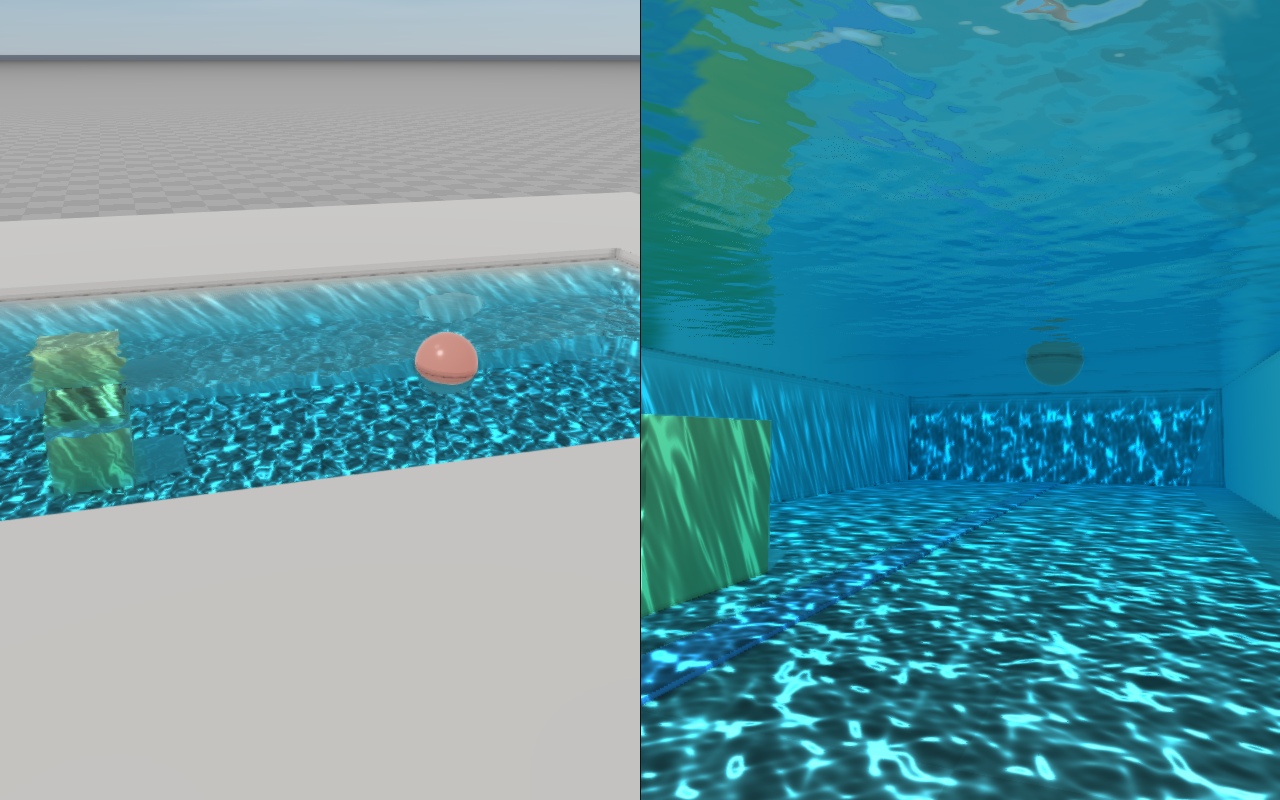
Under water
The camera is under water when it is below the surface above it, inside a rectangle's footprint and above its bottom. An ocean has no bottom. Then the whole view is seen through the water:
- The view itself: objects fade with distance into the scattered light. The scattered light is brighter near the surface and toward the sun.
- Snell's window: looking up, the sky and the world above water show through a circle about 97° across.
- Outside the window: the surface reflects everything (total internal reflection), so it mirrors the underwater surroundings.
- At the waterline: the eye is either above or below the surface. A camera 1 cm above the water sees the surface from above, even where it passes in front of the near plane.
- Looking into a tank from outside: a camera beside a rectangle sees the surface through only the water inside it. Objects inside the tank seen through its glass wall are not dimmed by the water, since nothing marks where the wall is.
waterDiagnostics().cameraUnderwater reports this state.
The underwater view is independent of the underwaterEnabled post-process overlay. That overlay tints the whole image regardless of any water body.
Flowing water
WaterBody::flow turns a rectangle into a body of simulated shallow water. The water runs downhill over the scene below the rectangle, fills hollows, flows around rocks, piers and banks, and leaves through open edges. RaiSim bodies that move push it aside and leave wakes. The surface is drawn from the simulated depth and velocity: its ripples, foam and caustics drift with the current.
raisin::WaterBody creek = raisin::defaultWaterBody(raisin::WaterPreset::CalmLake);
creek.shape = raisin::WaterBodyShape::Rectangle;
creek.center = {0.0, 0.0, -3.2};     // below the terrain: the creek starts dry
creek.halfExtents = {19.0f, 6.0f};
creek.depth = 0.5f;
creek.waves.clear();
creek.flow.enabled = true;
creek.flow.cellSize = 0.08f;         // 475 x 150 cells
creek.flow.bedCeiling = 6.0f;        // the terrain reaches up to 6 m above center.z
creek.flow.manningRoughness = 0.035f;

raisin::WaterFlowSource spring;
spring.position = {-17.5, -1.2};     // world XY
spring.radius = 0.5f;
spring.flowRate = 0.18f;             // m^3/s
spring.velocity = {0.8f, 0.0f};      // m/s
creek.flow.sources.push_back(spring);
viewer.setWaterBody("creek", creek);

while (true) {
  world->integrate();
  viewer.setWaterTimeSeconds(world->getWorldTime());   // the water advances with its clock
  viewer.update(1280, 720, false, 0, 0, false);
}
The dynamics
The water is described by its depth
- Gravity pushes the water down the slope of its surface
. Still water over any bed, around islands and against banks, stays still and level. - Waves travel at
relative to the current: 2 m/s in 0.4 m of water. - Bed friction follows Manning's law with roughness
( manningRoughness). On a long slopethe water settles where friction balances gravity; in a wide channel it flows at . The example creek carries 0.18 m³/s down a 7.5 % slope with = 0.035 in a channel about 1.5 m wide, up to 16 cm deep at about 1.8 m/s. - Sources add water at
per unit area ( WaterFlowSource, at most 16 per body),and . A source is a disc: every cell whose center lies in it gets an equal share of flowRate, or the cell under its center when the disc holds no cell center. Water entering brings the source'svelocity; a drain takes the water above it with its own velocity, never more than is there, so it lowers the water without speeding it up. - Shorelines move: water runs onto dry ground and recedes from it. A cell holding less than 1 mm counts as dry.
The total volume changes only by what the sources add and drain and what leaves through open edges. Foam forms where the water runs fast and shallow (Froude number well above one, such as over a drop), drifts with the current and fades within about a second (foamStrength).
The bed
The rectangle is divided into cells of about cellSize. The bed of each cell is the highest surface below it, seen from center.z + bedCeiling down to center.z - depth:
- RaiSim objects, visuals and instanced visuals that cast shadows form the bed. Foliage that sways in the wind does not.
- A solid that rises through
bedCeiling(a pier, a bank) blocks the water. Anything wholly above it, such as a bridge deck or a canopy, does not, and the water flows under it. - RaiSim bodies that are not static are captured every frame while any part of them is in the water (
movingBodies). A moving body pushes the water it takes up to the cells around it, which raises a bow wave ahead of it and leaves a trough behind it; the volume is kept.
The rest of the bed is captured when the simulation starts and again when objects or visuals are added or removed, or a static RaiSim object moves or changes its body type. A visual that moves is not followed; use a kinematic RaiSim body for an obstacle that moves. resetWaterFlow(name) starts the body over. At the start, every cell whose bed lies below center.z fills with still water up to center.z, so a center.z below the terrain starts dry. edges makes the rectangle's edges Open (the water leaves as if the bed continued beyond them) or Closed (walls).
Time
The simulation advances with the water clock (setWaterTimeSeconds, advanceWaterTime) when a color render finds the clock moved; renders at the same water time do not step it again. It takes as many steps as the fastest wave needs to stay stable (for water below the bed ceiling), at most 64 per render. If a frame needs more (after a stall), the rest of the time is dropped and reported in waterDiagnostics().flowTimeDropped. flowSteps reports the steps of the last render.
Querying the flow
sampleWaterFlow(worldXY) returns the simulated water above a horizontal position:
| Field | Meaning |
|---|---|
inside | The position lies in a simulated body whose state has been read back. |
wet | The water is deeper than 1 mm. |
surfaceHeight | World z of the surface (of the bed where dry). |
bedHeight | World z of the bed, without the moving bodies. |
depth | Water depth. |
velocity | Depth-averaged horizontal velocity in the world frame. |
timeSeconds | Water time of the state sampled. |
The state is copied back from the GPU after a render, so it trails the drawn water by one or two frames. Where a moving body stands or floats in the water, the sample reports the water around it: the surface and velocity of the nearest water no moving body covers, and the depth of that surface over the bed below the body. That is the water the body sits in, so it can be used for buoyancy and drag. The creek example applies to each floating ball:
const auto water = viewer.sampleWaterFlow({p[0], p[1]});
// Volume of the ball below the surface, and the velocity of the ball relative to the water.
const double submerged = std::clamp(water.surfaceHeight - (p[2] - r), 0.0, 2 * r);
const double volume = std::numbers::pi * submerged * submerged * (3 * r - submerged) / 3;
const Eigen::Vector3d relative(v[0] - water.velocity.x, v[1] - water.velocity.y, v[2]);
const double area = std::numbers::pi * r * r * submerged / (2 * r);
const Eigen::Vector3d drag = -0.5 * rho * cd * area * relative.norm() * relative;
ball->setExternalForce(0, drag + Eigen::Vector3d(0, 0, rho * g * volume));
Cost
The simulation runs on the GPU; its cost grows with the number of cells times the steps a frame takes, which grow with the speed of the fastest wave over the cell size. A 12 m x 12 m pool fed by a spring, with four piers and a moving box, at High and 1600 x 900 on an RTX 2070 SUPER (rayrai_benchmark --only=water_flow):
| Cells | Frame | Added by the simulation |
|---|---|---|
| plain water, not simulated | 1.9 ms | |
| 10 cm (120 x 120) | 2.6 ms | about 0.7 ms |
| 5 cm (240 x 240) | 3.5 ms | about 1.6 ms |
5 cm, movingBodies off | 3.2 ms | about 1.3 ms |
Quality settings
RenderQualitySettings holds the cost controls of water:
| Field | Default | Meaning |
|---|---|---|
waterEnabled | true | Draw water bodies. |
waterTileResolution | 32 | Mesh density, quads per tile side, [8, 64] (multiple of 4). Waves shorter than about four vertex spacings are left to the shading. The surface is shaded once per pixel at any mesh density, so finer tiles cost only their geometry. |
waterLodDistanceScale | 1 | How far each mesh level reaches; larger values keep fine mesh further away, [1, 8]. 1 is the shortest reach that keeps the levels free of cracks. |
waterScreenSpaceReflections | true | Reflect objects visible on screen; off reflects only the sky. |
waterReflectionSteps | 32 | Reflection search steps, [4, 96]. |
waterReflectionMaxDistance | 60 m | Longest reflection ray, [1, 1000] m. |
waterCaustics | true | Caustic light on the floor. |
waterUnderwaterView | true | Absorb and scatter the view while the camera is under water. |
waterSkyCaptureResolution | 128 | Face size of the reflected sky, [16, 256] pixels. It is redrawn when the sky changes, and every frame when the background is an environment cubemap. |
Values outside these ranges are clamped, not rejected. The presets set:
| Preset | Tiles | Reflections | Caustics | Sky |
|---|---|---|---|---|
| Fast | 16 | off | off | 32 |
| Balanced | 24 | 16 steps | on | 64 |
| High | 32 | 32 steps | on | 128 |
| Ultra | 48, LOD scale 1.5 | 48 steps, 120 m | on | 256 |
The mesh is a set of square tiles fixed in the body frame. Tiles near the camera are fine and coarsen with distance. Vertices slide smoothly from one level to the next, so the surface neither cracks nor pops as the camera moves. An ocean is positioned relative to the camera, so it stays smooth thousands of kilometres from its center.
Cost
Cost of an ocean around 256 floating primitives at 1600 x 900 on an RTX 2070 SUPER, measured with rayrai_benchmark --only=water:
| Preset | Without water | With the ocean | Water cost |
|---|---|---|---|
| Fast | 0.47-0.54 ms | 1.38 ms | about 0.85 ms |
| High | 1.65 ms | 3.35 ms | about 1.7 ms |
| High, camera under water | 1.65 ms | 3.3 ms | about 1.65 ms |
| Ultra | 2.12-2.15 ms | 4.0 ms | about 1.85 ms |
At High, about 0.4 ms of that is the reflection search; each step costs about 0.01 ms. The mesh costs little: going from 8 to 64 quads per tile adds about 0.2 ms. The sky reflection is redrawn only when the sky changes, unless the background is an environment cubemap; then it is redrawn every frame.
Reference
WaterBody
| Field | Default | Range | Meaning |
|---|---|---|---|
shape | Ocean | Ocean, Rectangle | Infinite plane, or a rotated rectangle. |
center | (0, 0, 0) | finite | z is the mean surface height; x, y the rectangle center (for an ocean, the wave phase origin). |
halfExtents | (5, 2.5) m | (0, 10⁵] m | Rectangle half sizes along its local X and Y. |
depth | 2 m | (0, 10⁴] m | Rectangle depth below the mean level; the camera is under water only above this bottom. |
yawRadians | 0 | Rotation of the body frame about +Z; wave and ripple directions are in this frame. | |
edgeFadeDistance | 0.5 m | ≥ 0 | Rectangle: waves fade out over this distance inside the edges. |
waves | none | at most 32 | Gerstner waves; empty gives a still surface. |
absorption | (0.45, 0.07, 0.035) /m | ≥ 0 | Absorption coefficient, linear RGB. |
scattering | (0.02, 0.045, 0.07) /m | ≥ 0 | Scattering coefficient, linear RGB. |
scatteringAnisotropy | 0.3 | [−0.9, 0.9] | Henyey-Greenstein g; above 0 scatters forward. |
indexOfRefraction | 1.333 | [1, 2] | Fresnel reflection and refraction. |
roughness | 0.04 | [0.01, 1] | Microfacet roughness at rest. |
rippleStrength | 0.7 | [0, 4] | Ripple normals; 0 turns them off. |
rippleScale | 2.5 m | [0.05, 100] m | Size of the ripple pattern. |
rippleDirection | (1, 0) | not zero | Main ripple travel direction (normalized). |
foamColor | (0.82, 0.86, 0.88) | [0, 1] | Foam albedo, linear RGB. |
shorelineFoamDepth | 0.25 m | ≥ 0 | Foam where the water is shallower; 0 turns it off. |
crestFoamStrength | 0.6 | [0, 1] | Foam on compressed crests. |
crestFoamThreshold | 0.45 | [0, 1] | Crest foam where the surface is compressed below this fraction of its rest area. |
causticStrength | 0.6 | [0, 1] | Fraction of the sunlight on the floor gathered into caustics; 0 turns them off. |
causticScale | 1.5 m | [0.05, 100] m | Size of the caustic pattern. |
shorelineFadeDepth | 0.06 m | [0, 10] m | Reflections fade in over this depth at the shore. |
flow | off | Shallow-water simulation (below). |
The struct defaults are the Ocean preset without waves; defaultWaterBody also generates the waves of its preset.
WaterFlow and WaterFlowSource
| Field | Default | Range | Meaning |
|---|---|---|---|
enabled | false | Simulate the body, which must be a Rectangle. | |
cellSize | 0.25 m | [0.01, 100] m | Grid spacing; at most 1024 cells along a side. |
manningRoughness | 0.03 s/m^(1/3) | [0, 0.5] | Bed friction: about 0.012 for concrete, 0.03 for a natural stream bed, 0.1 for a weedy one. |
edges | Open | Open, Closed | Water leaves through open edges; closed edges are walls. |
bedCeiling | 2 m | (0, 10⁴] m | Height above center.z up to which scene geometry forms the bed. |
movingBodies | true | Capture the moving RaiSim bodies every frame so they push the water. | |
foamStrength | 0.6 | [0, 1] | Foam where the water runs fast and shallow; 0 turns it off. |
sources | none | at most 16 | WaterFlowSource discs. |
WaterFlowSource field | Default | Range | Meaning |
|---|---|---|---|
position | (0, 0) | World XY of the disc center, metres. | |
radius | 0.5 m | (0, 10⁴] m | Disc radius. |
flowRate | 0.05 m³/s | finite | Volume per second; negative drains, at most the water the disc holds. |
velocity | (0, 0) | finite | Horizontal velocity of the entering water, world frame, m/s. |
Diagnostics
waterDiagnostics() describes the last color render. All fields but bodyCount are zero (false) when that render had no water in view and the camera was not under water.
| Field | Meaning |
|---|---|
bodyCount | Registered water bodies. |
bodiesDrawn, tilesDrawn | Bodies and surface mesh tiles drawn. |
trianglesDrawn | Surface triangles per pass over the mesh (drawn once per render, once more to compose multisampled edges). |
sceneCaptured | The scene color and depth were copied for refraction. |
screenSpaceReflections | On-screen objects were reflected. |
cameraUnderwater | The camera was inside a body. |
underwaterFogDrawn | The underwater view pass ran (needs waterUnderwaterView). |
skyCaptureFaceSize | Face size of the reflected sky cubemap, pixels. |
timeSeconds | Water time of the render. |
flowBodies, flowSteps | Simulated bodies updated for the render, and the steps they took. |
flowTimeDropped | Water time the simulations skipped after a stalled frame, seconds. |
Limitations
- Water is visual: it applies no buoyancy or drag. Use
sampleWaterSurfaceorsampleWaterFlowto compute those yourself. - Only rectangles can be simulated, with at most 1024 cells along a side. The simulated water is one layer: a floating body counts as a column down to the bed, so the water flows around it, not under it, and water that falls over a cliff runs down its face rather than through the air. Moving bodies above one another count as one column.
- Where two solids that rise through
bedCeilingoverlap, the overlap counts as open bed, so water can pass through a wall built of overlapping segments there. Let such pieces touch instead of overlapping, or keep their tops belowbedCeiling. - The water must stay below
center.z + bedCeiling: a source that keeps filling a closed basin above it is not supported. - On a simulated body,
sampleWaterSurfaceand the underwater view use the simulated surface without the Gerstner waves drawn on it. - Depth, segmentation and LiDAR renders do not see water, and water casts no shadows.
- Reflections of objects come from the screen. An object outside the image, or hidden behind another, is not reflected; the sky is reflected instead.
- Waves do not feel the floor. They keep their height up to the shore of an ocean and up to the edge band of a rectangle.
- Transparent objects, coordinate frames, point clouds and precipitation are drawn after the water. Below the surface they are hidden from a camera above it, and they are not dimmed by the water around a camera below it.
- Fog on water follows the full PBR and mesh shaders. Plain PBR visuals drawn by the compact PBR shader use a slightly different fog curve, so in dense fog they can fade a little differently from the water beside them.
- Water bodies are not part of
.rscenefiles and are not sent to the TCP viewer.