Foliage and forest rendering
Use InstancedVisuals for repeated trees, grass, and ground cover. Rayrai
combines mesh LOD, per-plant visibility checks, compatible color/shadow draw
batching, rooted wind deformation, and two-sided leaf lighting. Vegetation
added this way is visual-only; add RaiSim collision objects separately.
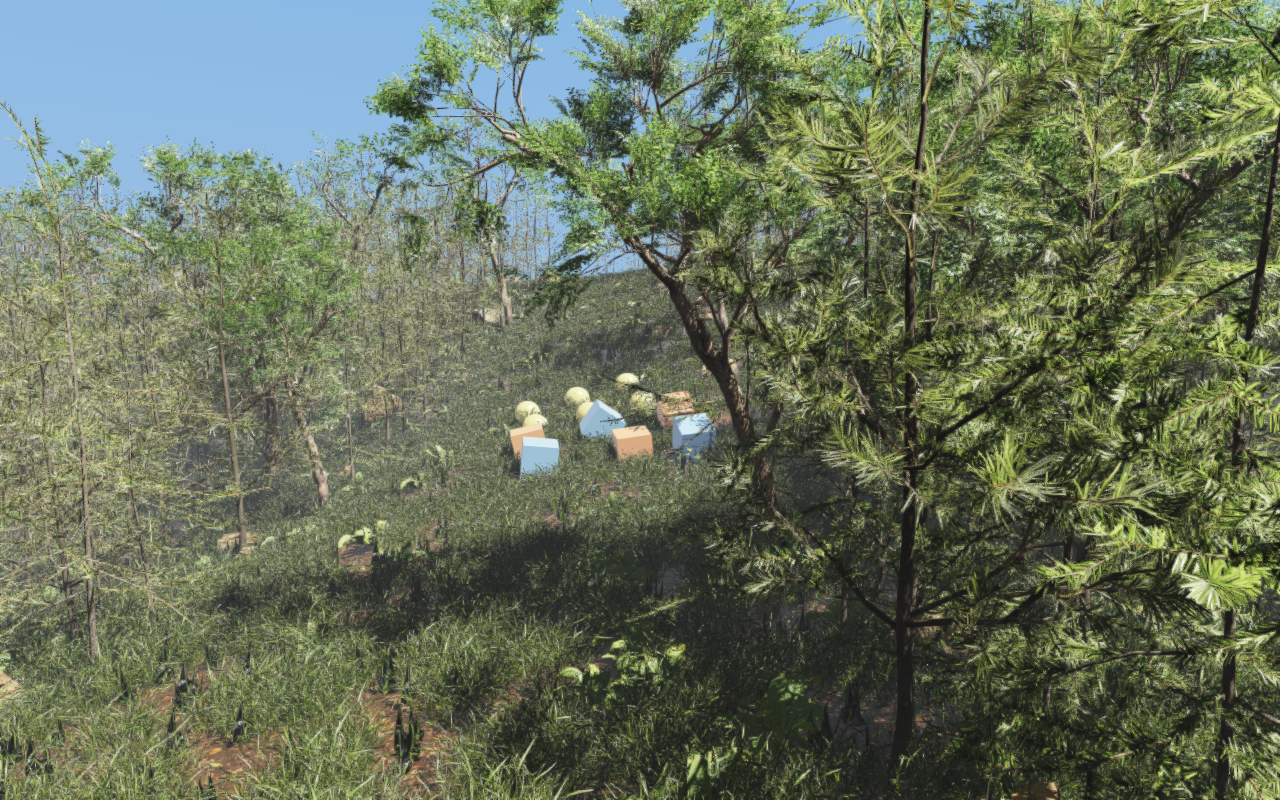
The dense forest example puts these features together on an 80 by 80 metre heightmap with more than 63,000 plants.
Create a vegetation batch
Create one batch for each source mesh and populate it with InstanceSpec
transforms. Bulk addInstances avoids repeated per-instance setup. Place
each plant’s local root at zero before scattering, and use the terrain height
at its position. Imported display-lineup offsets otherwise leave plants
floating or buried on slopes.
viewer.setAsyncMeshLoadingEnabled(true);  // The default; set before creating mesh visuals.
auto grass = viewer.addInstancedVisuals(
  "grass", raisim::Shape::Mesh, glm::vec3(1.0f),
  glm::vec4(1.0f), glm::vec4(1.0f), "/path/to/grass/model.gltf", true);

std::vector<raisin::InstancedVisuals::InstanceSpec> instances;
raisin::InstancedVisuals::InstanceSpec plant;
plant.position = glm::vec3(x, y, terrain->getHeight(x, y));
// Yaw about +Z as a (w, x, y, z) quaternion.
plant.orientation = glm::vec4(std::cos(yaw * 0.5f), 0.0f,
                              0.0f, std::sin(yaw * 0.5f));
plant.scale = glm::vec3(1.0f);
instances.push_back(plant);  // Repeat for the remaining scatter positions.
grass->addInstances(instances);
grass->setUseMeshColor(true);
grass->setAutomaticMeshLodEnabled(true);
grass->setProjectedLodPolicy(true, 2.0f, 8);
grass->setShadowFoliageLodPolicy(true, 2.5f, 16);
grass->configureFoliageWind(0.0f, 0.5f, 0.09f, 0.7f, 0.2f);
grass->setSortTransparentInstances(false);  // Opaque/alpha-masked plants.
grass->setFoliageImpostorPolicy(false);
The orientation glm::vec4 holds the quaternion in (w, x, y, z) order:
its x component is w and its w component is z.
setUseMeshColor(true) keeps the imported material/texture colors. The wind
arguments are local root height, tip height, strength, stiffness, and flutter
weight. configureFoliageWind also enables impostors, the shadow foliage LOD
policy (2.5 pixels, stride 16), and hierarchical cluster culling with default
parameters, which is why the example disables impostors after it. The global
wind field and its clock are render quality settings; see Weather and atmospherics. Keep
transparency sorting for genuinely alpha-blended assets.
Visibility, detail, and shadows
Automatic mesh LOD reduces the triangles in each plant. Projected-size LOD instead reduces the number of drawn instances as plants become small on screen. Neither changes the authored instance array. Eligible high-detail opaque or alpha-masked foliage uses per-instance LOD, so a nearby tree does not force all distant trees in the batch to use the same detail level. Smaller foliage meshes retain their batch-selected LOD while benefiting from per-instance culling and shared draw submission.
Control |
Effect |
|---|---|
|
Generate/select simplified mesh levels; enabled by default. |
|
Opt-in instance thinning below a projected pixel radius, with a maximum
stride ( |
|
Shadow-only instance thinning and optional maximum shadow distance; off
until set or enabled by |
|
Shadow casting is enabled by default. Foliage/wind configuration preserves the caller’s choice; the scene light must also have shadows enabled. |
|
Camera-facing quads for sufficiently small distant foliage; off until set
or enabled by |
|
Conservative cluster culling for large batches; off until set or enabled
by |
The renderer reuses visibility/LOD selections and instance uploads while their inputs remain valid. It caches transformed bounds, shares frustum preparation, and merges compatible foliage draws in color and shadow passes. Materials requiring special ordering or unsupported state retain the fallback paths. These optimizations require no application-side batch collector.
Foliage occlusion uses conservative depth tests with wind-expanded bounds and
alpha-aware coverage. Each camera summarizes its depth prepass in tiles holding
the farthest depth of all their samples, and an instance is skipped only when
its whole projected box lies behind every tile it touches. With OpenGL 4.3, the
foliage the renderer collects into shared draws is tested where the tiles are,
on the GPU: compute passes keep the visible instances in their original order
and write the instance counts of the draws, so the CPU never waits for the
depth and the image is the same as with the CPU test. The depth prepass is
culled in two phases: it first tests and draws the instances the camera’s last
colour pass kept, summarizes the depth again, and then tests the others against
it, so foliage hidden behind nearer foliage stays out of the prepass as well.
Instanced visuals that are not tested, such as rocks, draw first in the
prepass so their depth counts in both phases. Where the prepass draws opaque
foliage with the depth-only fragment stage (see below) and the GPU supports
GL_ARB_shader_draw_parameters, that stage also records which instances
have a fragment passing the depth test, counting fragments that tie the stored
depth. An instance the prepass drew without one cannot appear in the colour
pass, which tests the finished depth, so the colour pass skips it: in the
forest example it draws about half as many grass instances, nine in ten of
them visible. Draws that cannot be collected read the tiles back and test on
the CPU. The optional RenderQualitySettings::foliageAlphaDepthPrepass
adds an alpha-tested foliage depth pass; it is disabled by default. Its extra
geometry and texture work can cost more than it saves, so measure it for the
actual scene. Likewise, increasing shadow stride or enabling impostors changes
image quality and should be evaluated separately from renderer optimizations.
With the opaque depth prepass and alpha-to-coverage on (as in the High and Ultra presets), opaque foliage whose alpha is always one writes its depth either in the colour pass, which draws its geometry once, or in the depth prepass, which shades no hidden fragments. Both give the same image, but which is faster depends on the GPU and the scene: a dense grass field ran faster with the prepass on an RTX 5070, a city with the colour pass. The renderer times both for each camera with GPU timestamps over ten alternating renders, keeps the faster one, and measures again after 600 renders of that camera. In the prepass, such foliage draws with a depth-only fragment stage: its alpha cannot change the coverage, so the albedo fetch is skipped and the GPU tests depth before any fragment work. Without alpha-to-coverage (single-sample cameras, such as most RGB sensors), opaque foliage draws its prepass this way whatever its alpha.
Leaf lighting and cutouts
Material::foliage sets the foliage class, a rough non-metallic PBR base,
and doubleSided (no back-face culling, both faces lit). Set
foliageTwoSidedLighting = true for the foliage-specific thin-leaf diffuse
lighting. foliageTransmissionStrength controls thin-leaf direct and indirect
transmission; foliageTransmissionColor is a linear RGB tint of the base
color. High-fidelity indirect lighting also gathers illumination from the
opposite hemisphere, allowing leaves to respond to light behind the surface.
This is separate from glass-style transmissionFactor.
Use authored alpha masking for leaf cards. Color rendering and depth/shadow coverage honor the material’s alpha cutoff. Geometry-only needles with no texture alpha should remain opaque, as in the forest’s pine and fir assets. Normal-map filtering and specular antialiasing stabilize leaf highlights; authored roughness and specular factors still determine their appearance.
pbrEnvironmentLightingTint controls the procedural fallback’s illumination
independently of the visible sky/fog palette. HDR environment maps keep their
captured color. The forest uses subdued neutral fill and strong direct sunlight
with ACES tone mapping to preserve canopy shade and bright sunlit leaves.
The limited shader tier used on macOS (see the GPU capability tiers in PBR materials) supports directional shadow cascades and diffuse environment illumination too. Do not disable cascades solely because the platform uses a reduced shader tier. See Lighting, shadows, and HDR/IBL for shadow settings and PBR materials for material authoring.
Asynchronous loading and persistent LOD caches
Asynchronous loading is on by default; setAsyncMeshLoadingEnabled affects
only mesh assets added after the call. File import, texture decoding,
base-geometry preparation, and instanced LOD generation run on workers;
material resolution and incremental GPU uploads remain on the render thread,
which finishes an import only once its texture images are decoded. Pending
instances are skipped until ready. This does not make RaiSim physics
multithreaded.
Continue rendering while loading. pendingAsyncMeshLoadCount() includes
imports, LOD preparation, and unfinished GPU uploads, making it suitable for a
loading indicator. Every render spends up to 8 ms on loading;
pollAsyncMeshLoads(maxAssets) advances ready stages on the render thread
with its OpenGL context current. The forest example pauses physics until
loading completes and leaves camera input available. Without OpenGL 4.4 (for
example macOS), which lets worker threads stage textures and buffers for GPU
copies, the uploads of a large model can still cause short hitches.
Prepared mesh levels are cached as rayrai_cache_<source-file>.lods beside
the source asset, for example rayrai_cache_model.gltf.lods, and the prepared
geometry of models with at least 65,536 vertices as rayrai_cache_<source-file>.rgeo,
with how they were imported as rayrai_cache_<source-file>.rimp
(see Capture, diagnostics, and headless rendering). A read-only
asset directory falls back to the system temporary cache. Geometry fingerprints
include external buffers and LOD-affecting material settings; other material
and texture properties come from the current import, or from the stored import
description while every file that import read is unchanged. Invalid caches are
ignored and rebuilt. Deleting these optional files trades disk space for a
slower next load without reducing geometry precision or quality.
Set RAYRAI_ASYNC_LOD_CACHE_DIR to choose a cache directory.
Use the forest test and benchmark commands to measure completed frames separately from cold/cached loading. CPU preparation savings do not necessarily produce the same percentage improvement in full-frame FPS; GPU work, shadows, resolution, and camera position also matter.