
Server Example: Rscene Server
Overview
Serves a RaiSim Engine scene (.rscene) to the rayrai TCP viewer. raisim::World builds the physics from the file, and RaisimServer streams its bodies. The viewer reads the same file and draws everything else the scene shows: visual-only objects, foliage, lights, the sky and the terrain textures. The result matches what Rayrai Example: Forest From .rscene renders in-process. The example serves the rayrai forest, rsc/forest/rayrai_forest.rscene.
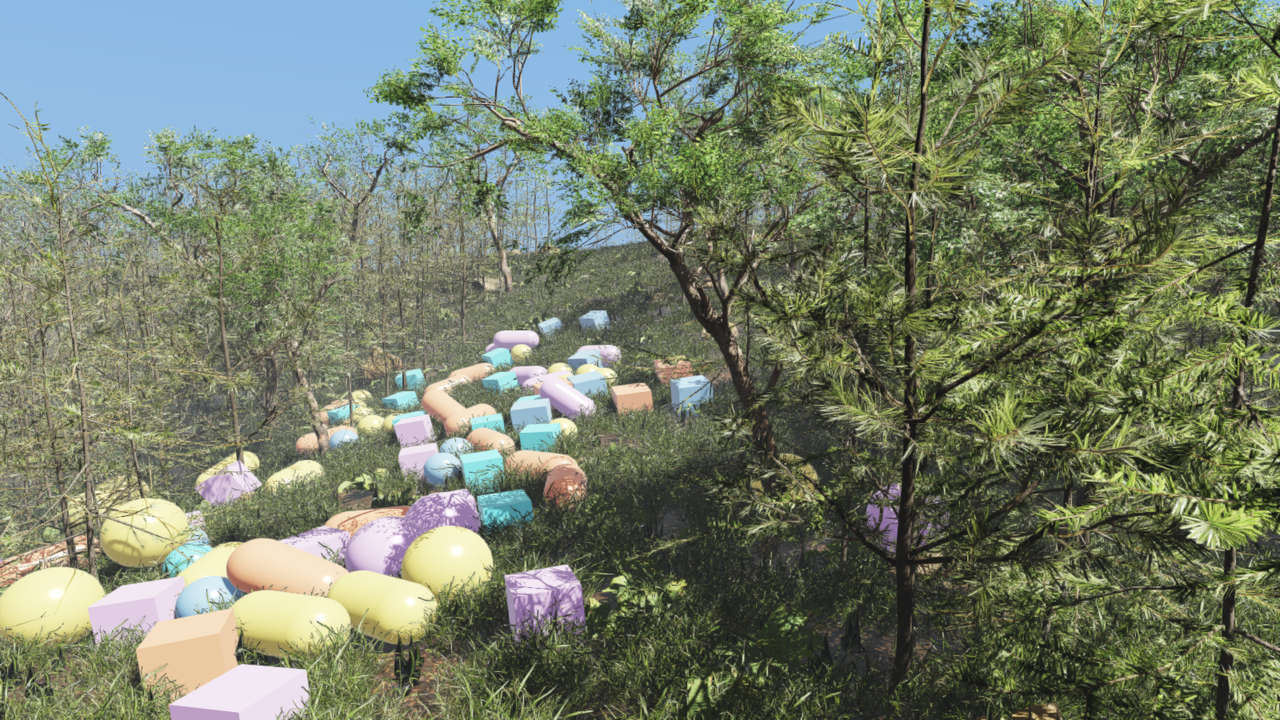
rscene_server.The viewer's icons are UIcons by Flaticon, credited in Asset Credits.
Target
CMake target: rscene_server. The source is examples/src/server/visualization/rscene_server.cpp. The target is skipped when the installed raisim cannot share scene files (raisim/server/SceneFileServer.hpp, new in v2.8.0).
Run
Start the viewer, then run the build-tree example:
# Terminal 1
./build-examples/examples/rayrai_tcp_viewer

# Terminal 2
./build-examples/examples/rscene_server
On Windows, run rscene_server.exe instead.
Scene files on another computer
A viewer that reaches the server through a non-loopback address asks before inspecting the server's paths or downloading files, even on the server's computer, unless it already has the scene's files. After consent, matching files at the server's paths or in resource directories are copied into the scene directory (~/.raisim/scenes), so later connections find them without asking; immutable cached files can be reused. Only missing files are downloaded from the server. The forest scene's files total about 430 MB. RaiSim Engine scenes describes the lookup and the prompt.
To accept a viewer from another computer, the server must listen on all interfaces. Add this before launchServer():
server.setBindLoopbackOnly(false);server.setSceneFileSharing(false) keeps the files on the server. A remote viewer then shows only the streamed bodies.