
Rayrai Example: Segmentation Camera
Overview
Renders an RGB image and a segmentation image from the same camera and the same physics snapshot and shows them side by side. Every object carries a semantic class (Ground, Box, Sphere, Cylinder), so the segmentation view can be colored by class, where both boxes share one color, or by object instance, where each object has its own color. RGB is shown on the left and segmentation on the right, at 640 x 400 pixels per image.
Screenshot
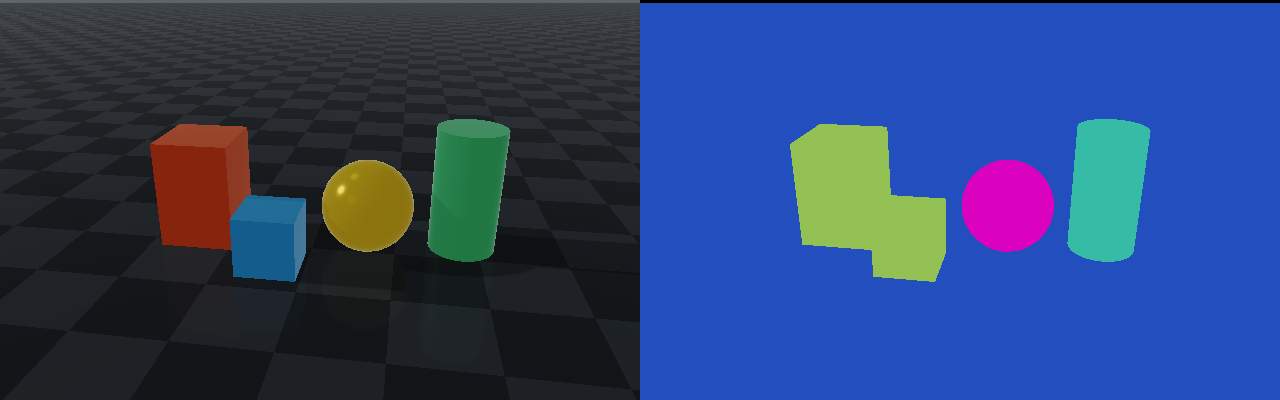
Target
CMake target: rayrai_segmentation_camera.
Run
From the repository root, build the target and run it:
source ./raisim_env.sh
cmake --build build-examples --target rayrai_segmentation_camera --parallel 2
./build-examples/examples/rayrai_segmentation_camera
See Build examples to configure a new build directory.
On Windows, run rayrai_segmentation_camera.exe instead. This example renders in process with rayrai and does not need rayrai_tcp_viewer.
Semantic classes and object instances
The app starts with Color by set to Semantic class. Both boxes have the same Box label, so they have the same segmentation color even though their RGB appearances differ. Segmentation colors visualize integer IDs; they do not come from an object's material or RGB color.
| Color by | Integer image used | Box A and Box B |
|---|---|---|
| Semantic class (default) | Semantic labels | Share one color because both have the Box label. |
| Object instance | World object indices | Have different colors because they are separate objects. |
Select Color by → Object instance in the app to color by object. The legend shows the class or object assigned to each color. Black marks pixels with no geometry within the camera's clipping range. Use Rotate camera for automatic rotation, or Camera angle to choose a view; both images move together.
Save a comparison
Use --screenshot to save a 1280 x 400 PNG with RGB on the left and the semantic segmentation on the right, then exit:
./build-examples/examples/rayrai_segmentation_camera --screenshot semantic.pngThe PNG contains the two images without the app controls or legend. Capture mode uses a hidden window and still requires a working OpenGL context.
Details
- Names the classes with
World::addSegmentationClass()and labels each body withObject::setSegmentationLabel(). - Renders the color image with
renderWithExternalCamera()and the segmentation image withRayraiWindow::renderSegmentation()from the sameraisin::Camera, so the two images line up pixel for pixel. - Reads the integer ids back with
raisin::Camera::readSegmentation()and colors them withSegmentationCamera::colorize(), which gives each id a fixed color; background pixels are black.
See Segmentation camera for the images, labels and the URDF and XML syntax.